Special Launch offer: Get Pro free for 14 days — no credit card required arrow_forward
Official Documentation & Manuals • v1.2.1

RewardMate Complete Knowledge Base

The complete documentation suite for RewardMate: merchant setup wizard, point earning rules, checkout redemption slider, VIP loyalty tiers, gamification streaks, customer wallet, and developer APIs.

chat_bubble Suggest Edit
search
menu_book
57 Modules Comprehensive manuals
photo_library
19 Screen Mockups Click-to-zoom previews
bolt
100% HPOS Ready WooCommerce 8.0+ certified
terminal
APIs & Shortcodes 6 embeddable shortcodes
menu_book Table of Contents
📘 Merchant Guide Getting Started Free Core #1 • 2 min read

Getting Started link

RewardMate is a premium WooCommerce loyalty plugin for earning, redeeming, auditing, and automating customer reward points.

wp-admin/admin.php?page=rewardmate
Admin Control
RewardMate Dashboard Command Center
zoom_in Click to Zoom
photo_camera RewardMate Admin Dashboard: Visual health check displaying issued points, redeemed volume, liability, and point movement trends. dashboard.png
my-account/rewardmate-wallet
Storefront Wallet
Customer Points Wallet
zoom_in Click to Zoom
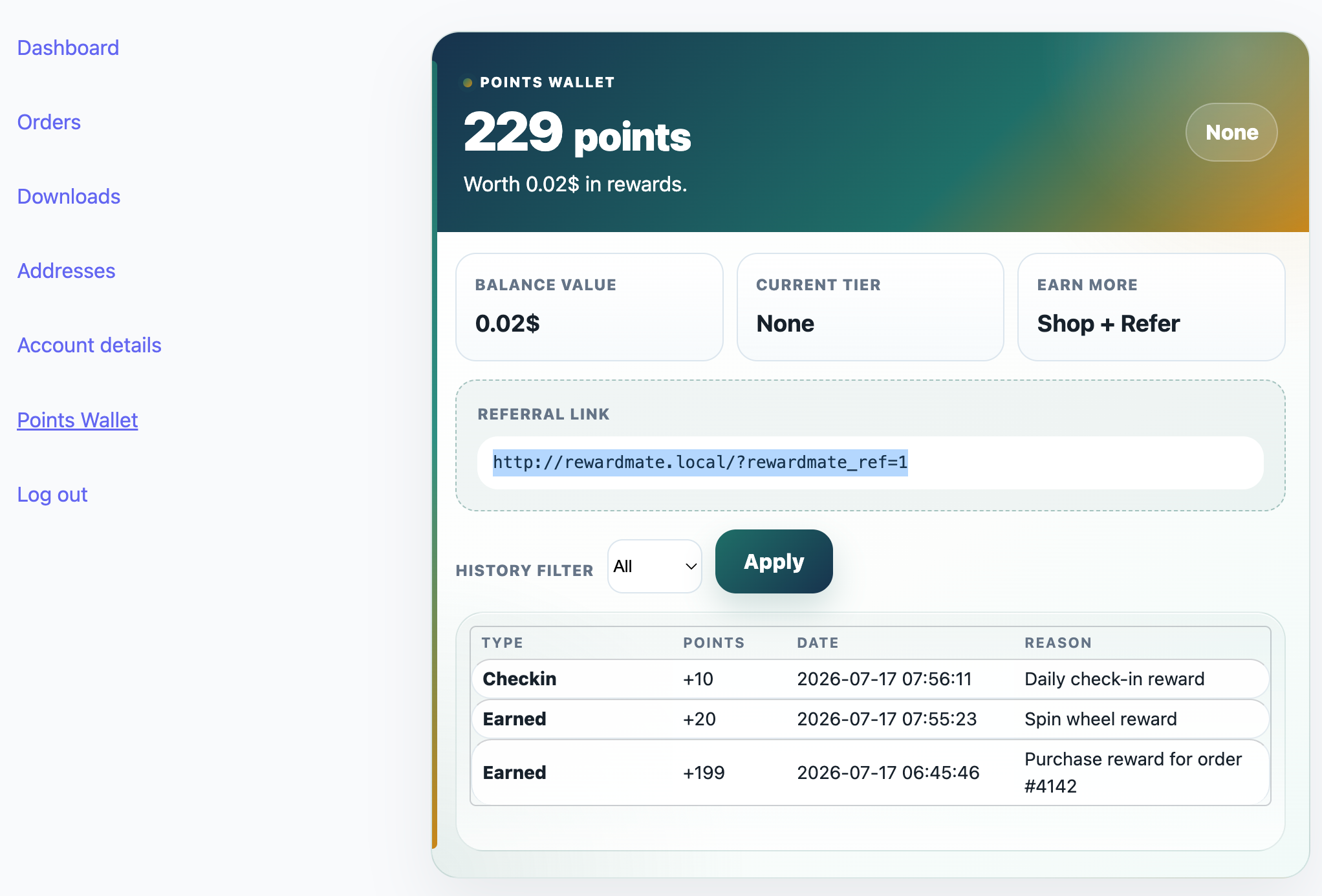
photo_camera Customer Points Wallet: What your shoppers see in WooCommerce My Account (live points balance, tier badge, referral link, and reward history). wallet.png
Reward strategy

Create a points economy that encourages repeat purchases without giving away more margin than the store can afford.

Customer experience

Show earnable points on products and checkout, let customers redeem with a slider, and give them a wallet they can understand.

Operational control

Audit every point change, approve high-value redemptions, export CSV reports, simulate rules, and review suspicious behavior.

Purchase rewards Checkout redemption Wallet history Loyalty tiers Campaign boosts REST API Webhooks

System Requirements

RequirementMinimum or SupportNotes
WordPress5.0+Use a supported WordPress version for security and REST API compatibility.
WooCommerce8.0+RewardMate declares compatibility with High-Performance Order Storage.
PHP7.4+PHP 8.x is recommended for modern WooCommerce stores.
ThemeAny WooCommerce-compatible themeFrontend blocks inherit RewardMate styling and should work in classic and block themes.
PluginsWooCommerce requiredCoupons, refunds, order statuses, user accounts, and products are all WooCommerce-driven.

Plugin Architecture

RewardMate stores customer balances in user meta, point history in user meta, order-linked ledger entries in order meta, and configuration in WordPress options. Purchase rewards are awarded on completed orders. Redemption points are reserved during checkout and finalized when payment or order status confirms the order.

📘 Merchant Guide Getting Started Free Core #2 • 2 min read

Core Concepts link

1. Points are not money, but they create liability

Customers see points as future value. RewardMate converts points to a discount using Value per 1000 points. The more generous that value is, the higher your outstanding liability becomes.

wp-admin/admin.php?page=rewardmate
Admin Control
RewardMate Core Concepts
zoom_in Click to Zoom
photo_camera Monitoring the loyalty lifecycle: Tracking point earning ratios, customer adoption, and outstanding liability. dashboard.png
checkout (points-redemption)
Storefront
Checkout Redemption Slider
zoom_in Click to Zoom
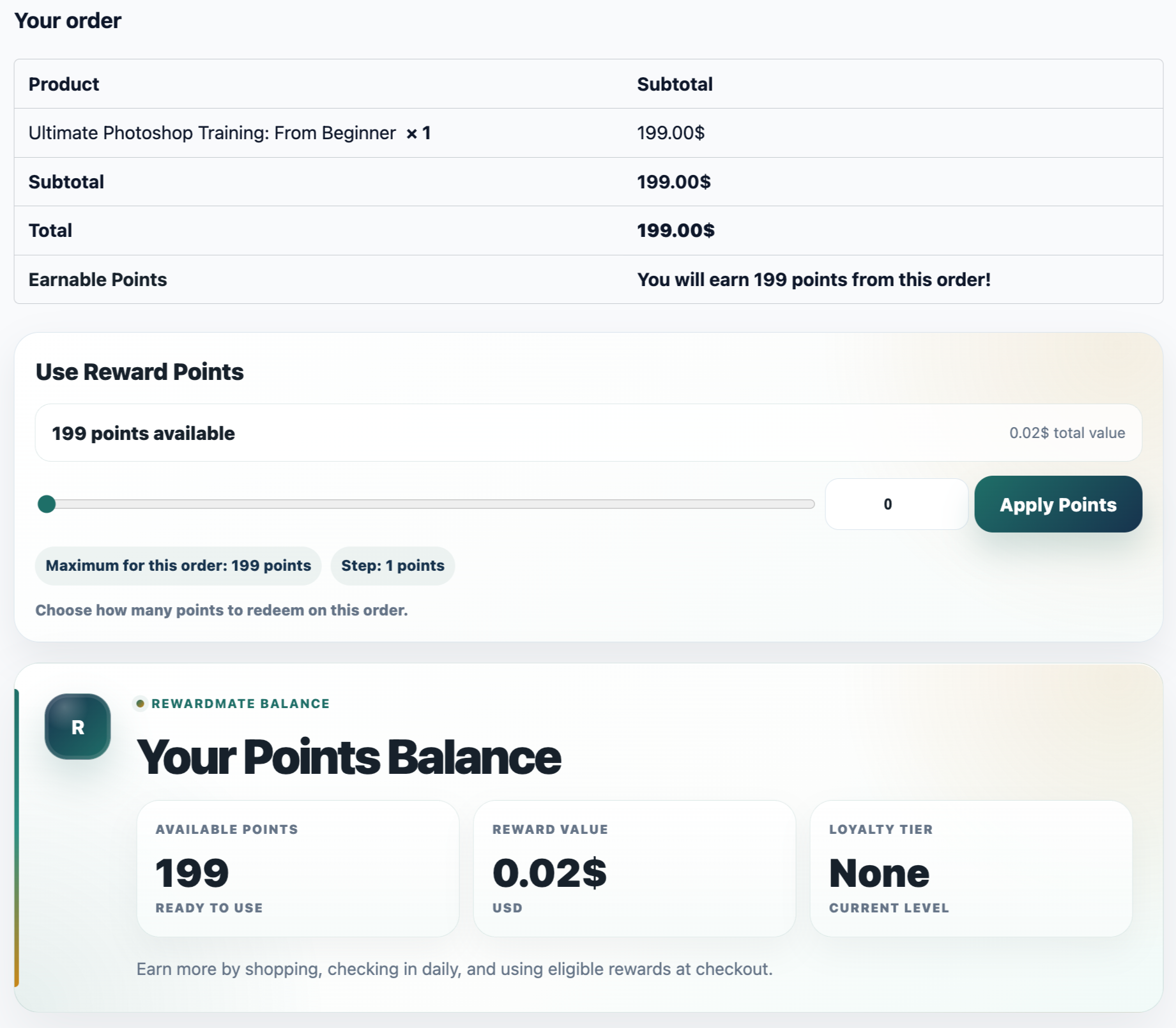
photo_camera Checkout redemption slider in action: Instant cart discount calculation with configurable percentage capping. checkout.png
Point value formula currency value = points * (value per 1000 points / 1000)

2. Earning and redemption are separate decisions

A store can award points generously while limiting checkout risk with Max Redemption Percentage, minimum redemption, step size, coupon stacking, and manual approval.

Purchase earning formula earned points = floor(line total in base currency * points per purchase * multipliers)
Balances

The current usable point total stored for each customer.

History

Customer-level activity such as earned, spent, gifted, check-in, and edited entries.

Ledger

Order-linked point events for purchase rewards, redemption, refunds, grace recovery, and imports.

Recommended launch posture: Start with simple earning, capped redemption, refund reversal, and analytics review. Add campaigns, referrals, and automation after the base economy behaves correctly.
📘 Merchant Guide Getting Started Free Core #3 • 2 min read

Installation link

Install WooCommerce first.
RewardMate only loads WooCommerce-dependent features when WooCommerce is active.
Upload RewardMate.
Place the plugin folder at wp-content/plugins/rewardmate or upload the premium ZIP from WordPress Admin > Plugins > Add New > Upload Plugin.
Activate the plugin.
Open WordPress Admin > Plugins and activate RewardMate. A WooCommerce-required admin notice appears if WooCommerce is missing.
Open settings.
Go to RewardMate > Settings and configure the General tab first.
Flush endpoints if needed.
If the Points Wallet endpoint returns 404, visit Settings > Permalinks and click Save Changes.
Updating and rollback: Before updating on production, export balances, history, and ledger data from RewardMate > Tools. Keep a database backup because points and ledgers live in WordPress user/order meta.

Do this before production activation

Back up the database, confirm WooCommerce order statuses, test with one logged-in customer, and export a baseline CSV after the first successful order.

wp-admin/admin.php?page=rewardmate
Admin Control
RewardMate Installation & Tools
zoom_in Click to Zoom
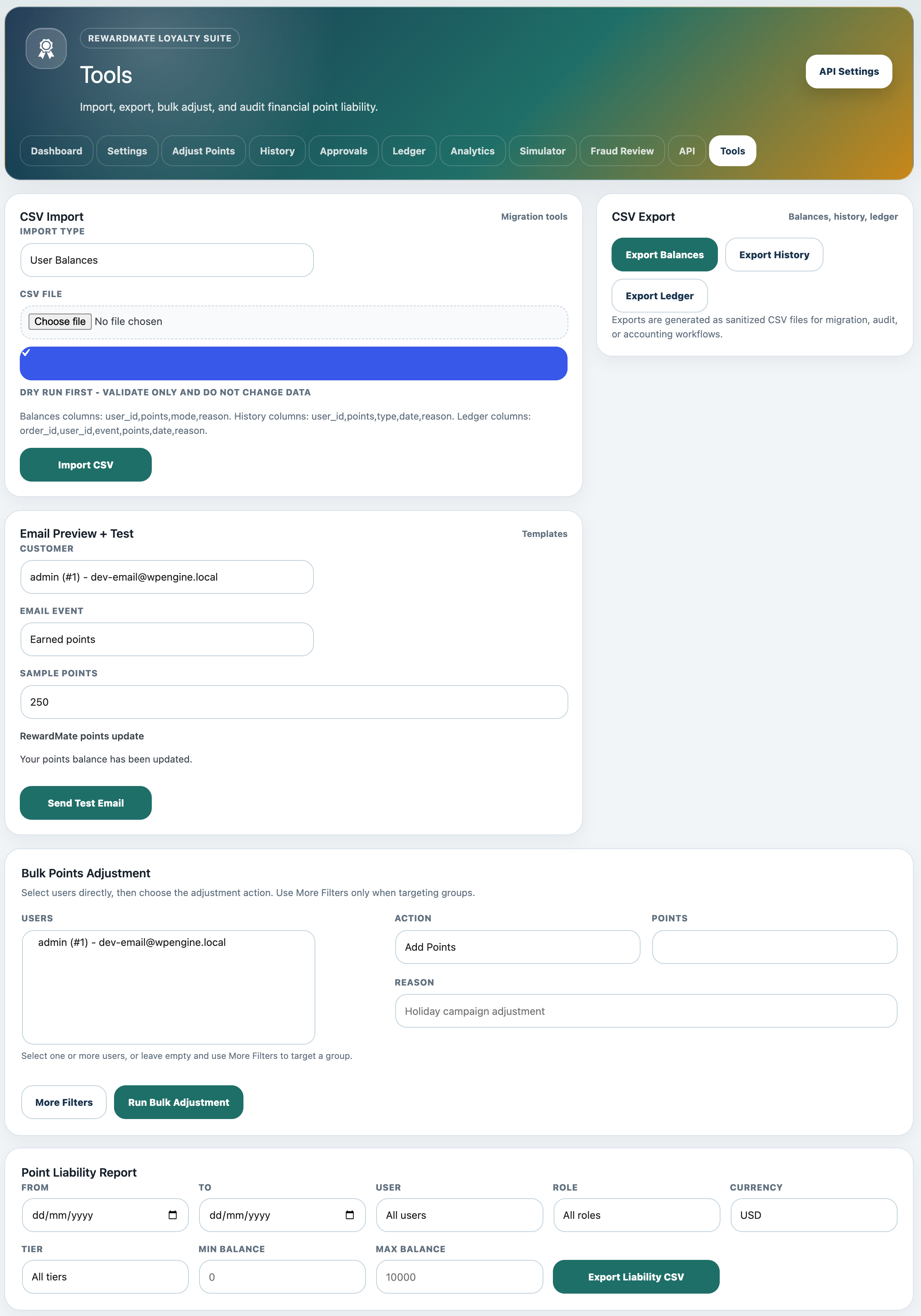
photo_camera Tools and system check: Test email triggers, dry-run balance adjustments, and verify database tables. tools.png
wp-admin/admin.php?page=rewardmate
Admin Control
RewardMate General Settings
zoom_in Click to Zoom
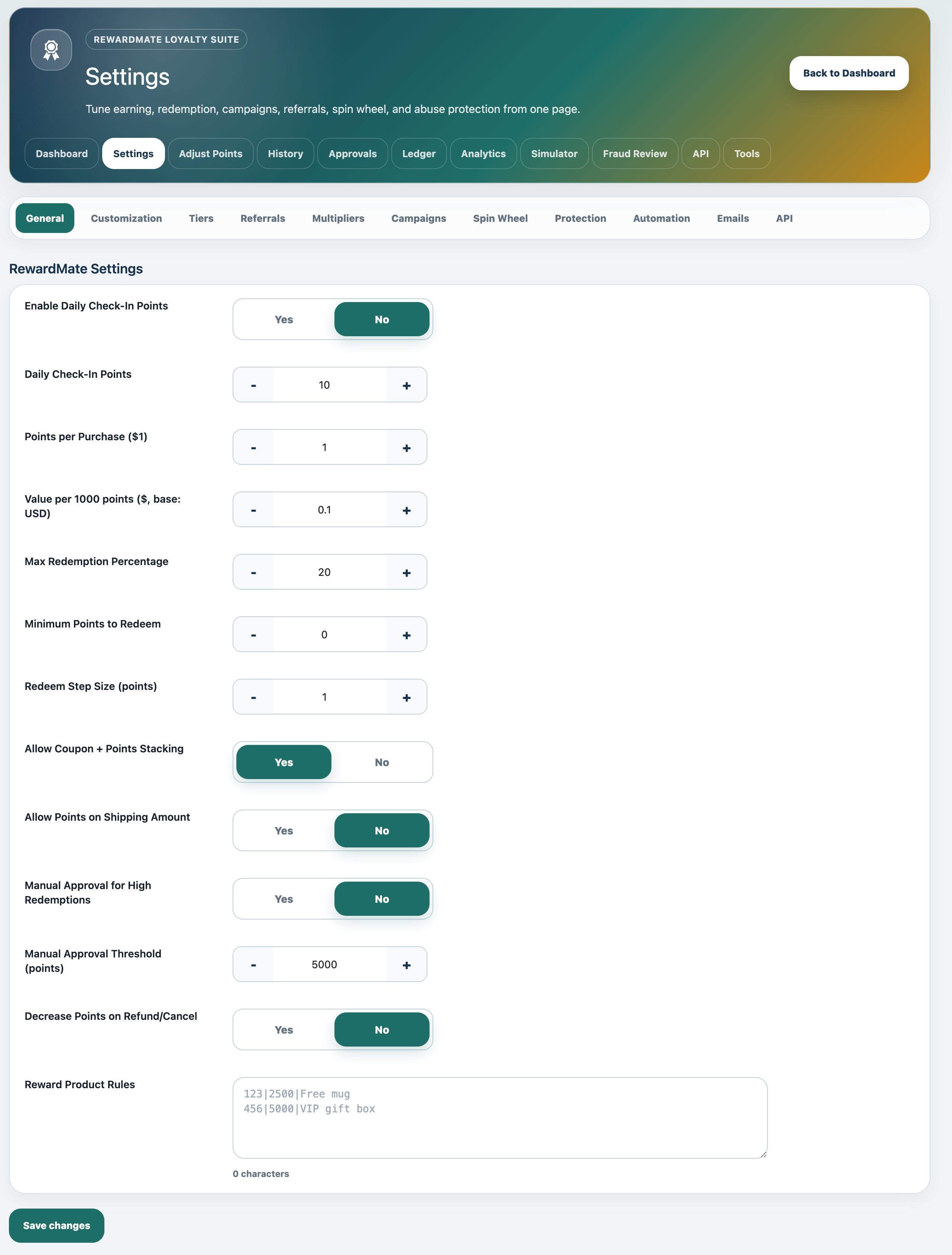
photo_camera General settings menu: Configure your earning ratio, redemption valuation, and checkout caps after activation. settings-general.png

Avoid this

Do not enable expiry, webhooks, external API writes, or aggressive multiplier stacking on the same day you launch the base points program.

📘 Merchant Guide Getting Started Free Core #4 • 2 min read

Quick Start Guide link

This setup creates a simple program: customers earn 1 point per dollar, can redeem up to 20% of an order, and can use daily check-in and spin wheel rewards after testing.

wp-admin/admin.php?page=rewardmate
Admin Control
General Settings Configuration
zoom_in Click to Zoom
photo_camera Step 1: Set Points per Purchase and Value per 1,000 Points in WooCommerce > Settings > RewardMate. settings-general.png
checkout (points-redemption)
Storefront
Checkout Redemption Verification
zoom_in Click to Zoom
photo_camera Step 2: Place a test order and verify the interactive redemption slider applies the correct coupon discount. checkout.png
Go to RewardMate > Settings > General. Set Points per Purchase to 1.
Set Value per 1000 points. Example: 10 means 1000 points equals $10.
Set Max Redemption Percentage to a margin-safe value such as 10 or 20.
Keep Allow Coupon + Points Stacking enabled only if discounts can safely combine.
Place a test order as a logged-in customer and move it to Completed.
Confirm points in RewardMate > History, RewardMate > Ledger, and the customer's My Account wallet.

Example: safe starter configuration

DecisionSuggested valueWhy it is safe
Points per Purchase1Simple for customers and easy for staff to audit.
Value per 1000 points5 to 10 in store currencyCreates a visible reward without turning points into cash-equivalent credit.
Max Redemption Percentage10% to 20%Protects order margin even when customers have high balances.
Minimum Points to Redeem100 or 500Prevents tiny discounts and keeps checkout cleaner.
Decrease Points on Refund/CancelYesKeeps balances aligned with completed revenue.
📘 Merchant Guide Getting Started Free Core #5 • 2 min read

Production Launch Checklist link

Staging order tested

Place a test order as a logged-in customer, complete it, confirm points, then refund or cancel and confirm reversal behavior.

wp-admin/admin.php?page=rewardmate
Admin Control
Rule Simulator
zoom_in Click to Zoom
photo_camera Pre-launch testing: Use the Rule Simulator to verify earning multipliers, VIP tier discounts, and checkout caps before go-live. simulator.png
wp-admin/admin.php?page=rewardmate
Admin Control
Launch Health Monitoring
zoom_in Click to Zoom
photo_camera Post-launch monitoring: Watch the live KPIs to ensure issued points align with your margin forecasts. dashboard.png
Checkout redemption tested

Apply points on cart and checkout, verify totals, then place the order and confirm points are deducted only once.

Wallet endpoint working

Open My Account > Points Wallet. If it 404s, refresh permalinks from WordPress Settings > Permalinks.

Email deliverability confirmed

Use Tools > Email Preview + Test and confirm SMTP or transactional mail is configured.

Financial liability reviewed

Check Analytics and export the liability report so finance understands outstanding point value.

Support team briefed

Share where to adjust points, read history, inspect ledgers, and explain customer balances.

📘 Merchant Guide Admin & Operations Free Core #6 • 2 min read

Dashboard Overview link

The dashboard summarizes issued points, redeemed points, liability, approval items, movement charts, top reward products, and quick actions.

wp-admin/admin.php?page=rewardmate
Admin Control
RewardMate dashboard
zoom_in Click to Zoom
photo_camera RewardMate dashboard with KPIs, charts, and quick actions. dashboard.png
Issued

Total points awarded in the selected analytics range. Use it to understand reward generosity.

Redeemed

Points customers have used as discounts or rewards. Use it to measure program adoption.

Liability

Estimated currency value of outstanding points. Use it for finance and margin planning.

Pending

Redemption requests waiting for approval. Use it when manual approval is enabled.

MenuPurposeUse it when
DashboardProgram overview and shortcuts.You need a fast health check.
SettingsAll earning, redemption, automation, email, API, and design options.You are configuring the loyalty program.
Adjust PointsManually increase or decrease a user balance.Support needs to correct or gift points.
HistoryCustomer-level point changes.You need a user audit trail.
ApprovalsManual review for high redemptions.Redemption approval is enabled.
LedgerOrder-linked point events.Accounting or support needs order context.
AnalyticsCharts, liability, top products, and repeat proxy metrics.You are reviewing reward performance.
SimulatorPreview earning, redemption, tiers, and balance components.You want to test rules before changing settings.
Fraud ReviewSuspicious activity flags.You are checking rate-limit or abuse signals.
APIAPI key, endpoint examples, webhook test tools.You are connecting external systems.
ToolsCSV import/export, email tests, bulk adjustment, liability export.You are migrating, auditing, or performing bulk operations.
📘 Merchant Guide Admin & Operations Free Core #7 • 10 min read

Complete Settings Reference link

Every option below includes what it does, the default value, and practical guidance. Start conservative, test in staging, then increase generosity after you understand liability.

General

wp-admin/admin.php?page=rewardmate
Admin Control
General settings
zoom_in Click to Zoom
photo_camera General settings control core earning, redemption, approvals, refund behavior, and reward products. settings-general.png
SettingDefaultWhat it doesRecommended use
Enable Daily Check-In PointsNoAllows logged-in customers to claim a daily bonus.Enable for community or repeat-visit stores. Disable for low-margin stores until abuse protection is configured.
Daily Check-In Points10Points awarded once per day when check-in is enabled.Keep small compared with purchase rewards.
Points per Purchase1Base earning ratio per one unit of store base currency.Use 1 for simple "$1 = 1 point" programs.
Value per 1000 points0.10Currency value used when points become a discount.Choose based on margin. A higher value increases liability.
Max Redemption Percentage20Caps how much of an order can be paid with points.Use 10-20% for most stores. Avoid 100% unless points are prepaid credits.
Minimum Points to Redeem0Requires a minimum balance before checkout redemption.Set a threshold to avoid tiny redemptions.
Redeem Step Size1Forces redemption increments such as 50, 100, or 500 points.Use round steps for cleaner checkout UX.
Allow Coupon + Points StackingYesAllows points discounts when coupons are already applied.Disable if coupons and points together can erase margin.
Allow Points on Shipping AmountNoIncludes shipping in max redeemable amount calculation.Keep disabled unless shipping is margin-safe.
Manual Approval for High RedemptionsNoQueues large redemptions for admin review.Enable for high-value programs or fraud-sensitive stores.
Manual Approval Threshold5000Minimum redemption size that requires approval.Set above normal order behavior to reduce admin load.
Decrease Points on Refund/CancelNoReverses earned points when orders are refunded or canceled.Enable for most production stores.
Reward Product RulesBlankLets customers redeem points for specific products using product_id|points_cost|label.Use for gifts, samples, and VIP items. Confirm stock and purchasability.

Enable purchase earning first, test checkout redemption second, then add daily check-in, spin wheel, referrals, and reward product rules one by one. This makes it easier to identify which rule produced each balance change.

How to choose point value

Work backward from your margin. If 1000 points equals $10 and a $100 order earns 100 points, the customer earns $1 in future value, before tiers or campaigns.

Customization

wp-admin/admin.php?page=rewardmate
Admin Control
Customization settings
zoom_in Click to Zoom
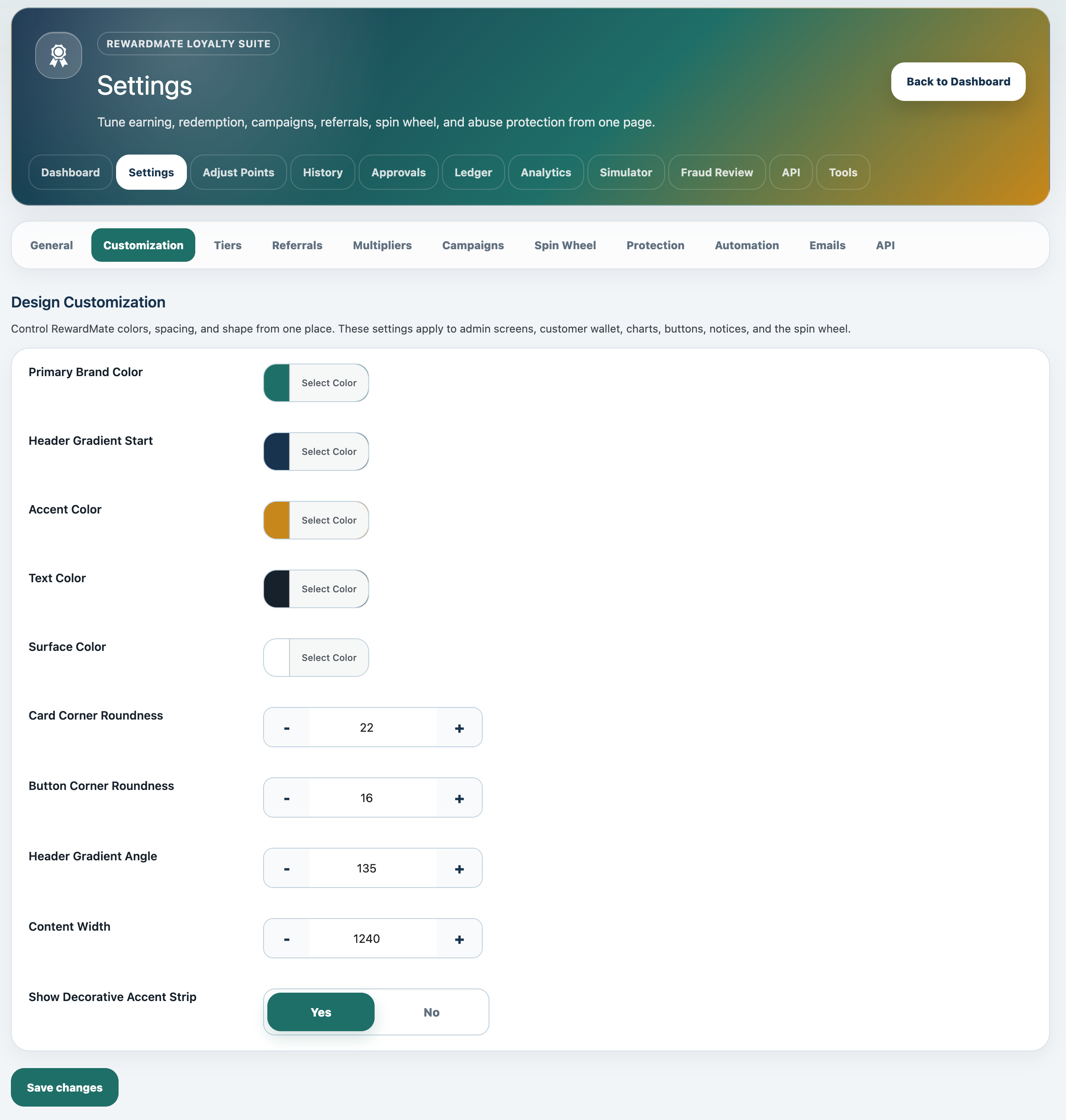
photo_camera Customization settings apply to admin screens, customer wallet, charts, buttons, notices, and the spin wheel. settings-customization.png
SettingDefaultPurpose and advice
Primary Brand Color#1f6f68Primary buttons, active states, wallet accents, charts, and spin wheel. Use a high-contrast brand color.
Header Gradient Start#17324dDark hero gradient and high-contrast elements. Keep dark enough for white text.
Accent Color#c88719Badges, highlights, and secondary chart lines. Avoid colors that imply errors unless intentional.
Text Color#17212bMain readable text. Test against surface color.
Surface Color#ffffffCards, panels, tables, and form surfaces.
Card Corner Roundness22Controls card and table radius. Accepted range: 8-36.
Button Corner Roundness16Controls button shape. Accepted range: 4-32.
Header Gradient Angle135Changes gradient direction. Use 135 for the default diagonal style.
Content Width1240Max width for admin and wallet blocks. Accepted range: 720-1600.
Show Decorative Accent StripYesShows slim accent lines on RewardMate cards and wallet sections.
Design advice: Use the customization tab to make RewardMate feel native to your store, but keep contrast high. The customer wallet and checkout redemption controls need to stay readable on small screens.

Tiers

wp-admin/admin.php?page=rewardmate#tiers
VIP Tiers
Tier settings
zoom_in Click to Zoom
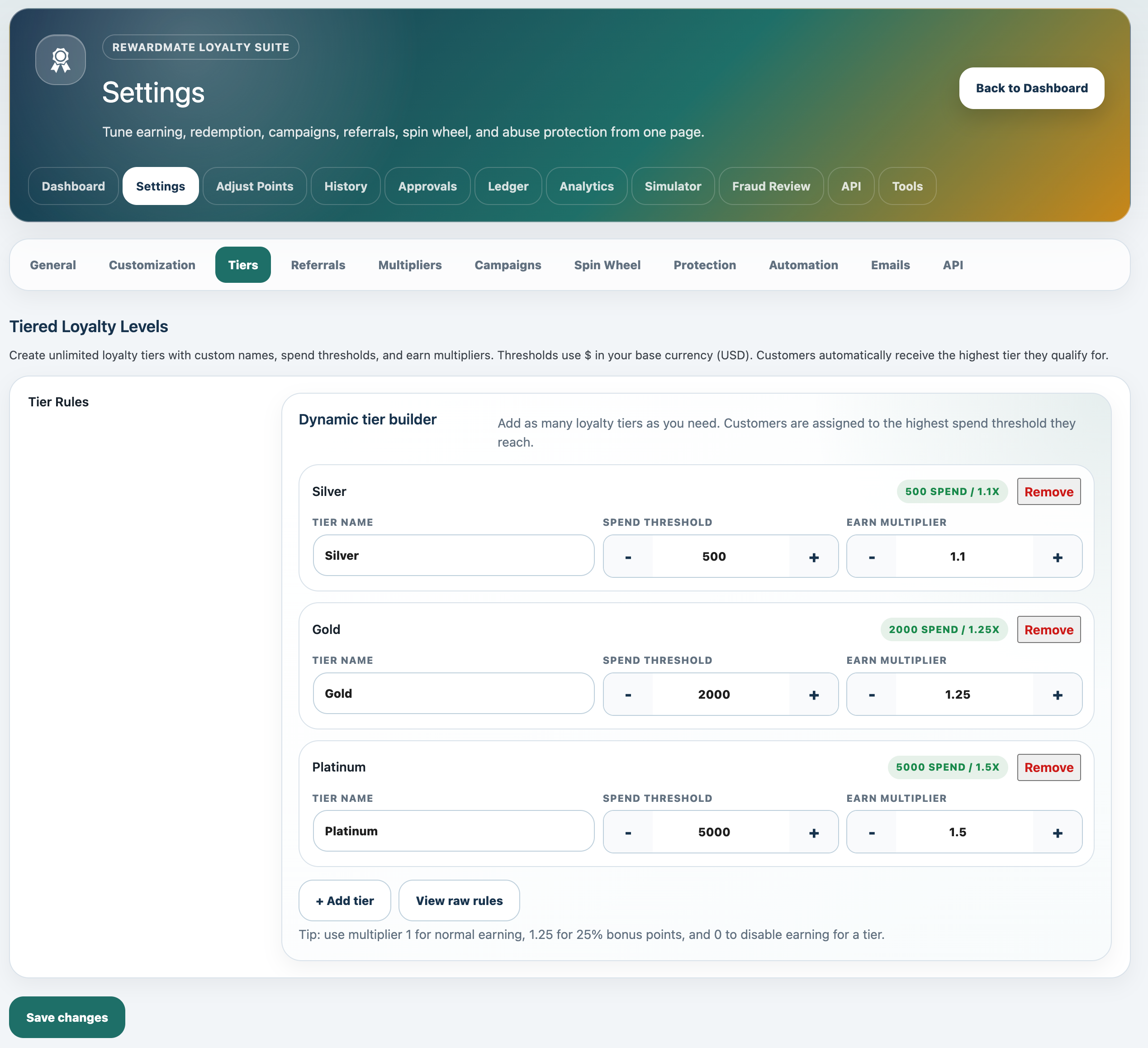
photo_camera Tier rules create spend-based loyalty levels with custom earn multipliers. settings-tiers.png

Tier rules use the format Tier name|Spend threshold|Earn multiplier. Customers automatically receive the highest tier whose threshold is less than or equal to their total WooCommerce spend.

Silver|500|1.10
Gold|2000|1.25
Platinum|5000|1.50
Best practice: Keep thresholds achievable but profitable. A multiplier of 1.25 means the customer earns 25% more points than the base purchase rule.
Tier patternExampleGood forWatch out for
Low threshold, small multiplierSilver at 500 spend / 1.1xEncouraging second purchases.Customers may reach it quickly, so forecast liability.
Mid threshold, meaningful multiplierGold at 2000 spend / 1.25xRewarding loyal customers without creating VIP operations.Stacking with campaigns can become generous.
High threshold, premium multiplierPlatinum at 5000 spend / 1.5xHigh-LTV customers and membership-style programs.Needs margin review and clear customer communication.

Referrals

SettingDefaultWhat it doesBest practice
Enable Referral RewardsNoActivates referral links like ?rewardmate_ref=USER_ID.Enable after testing first-order attribution.
Referrer Points500Points awarded to the referring customer after the referee's first completed order.Make this meaningful but lower than acquisition cost.
Referee Points200Points awarded to the new referred customer.Use as an onboarding incentive.

Referral rewards are awarded after the referred customer's first completed order. That timing avoids rewarding fake signups that never buy.

Multipliers and Exclusions

wp-admin/admin.php?page=rewardmate
Admin Control
Multiplier settings
zoom_in Click to Zoom
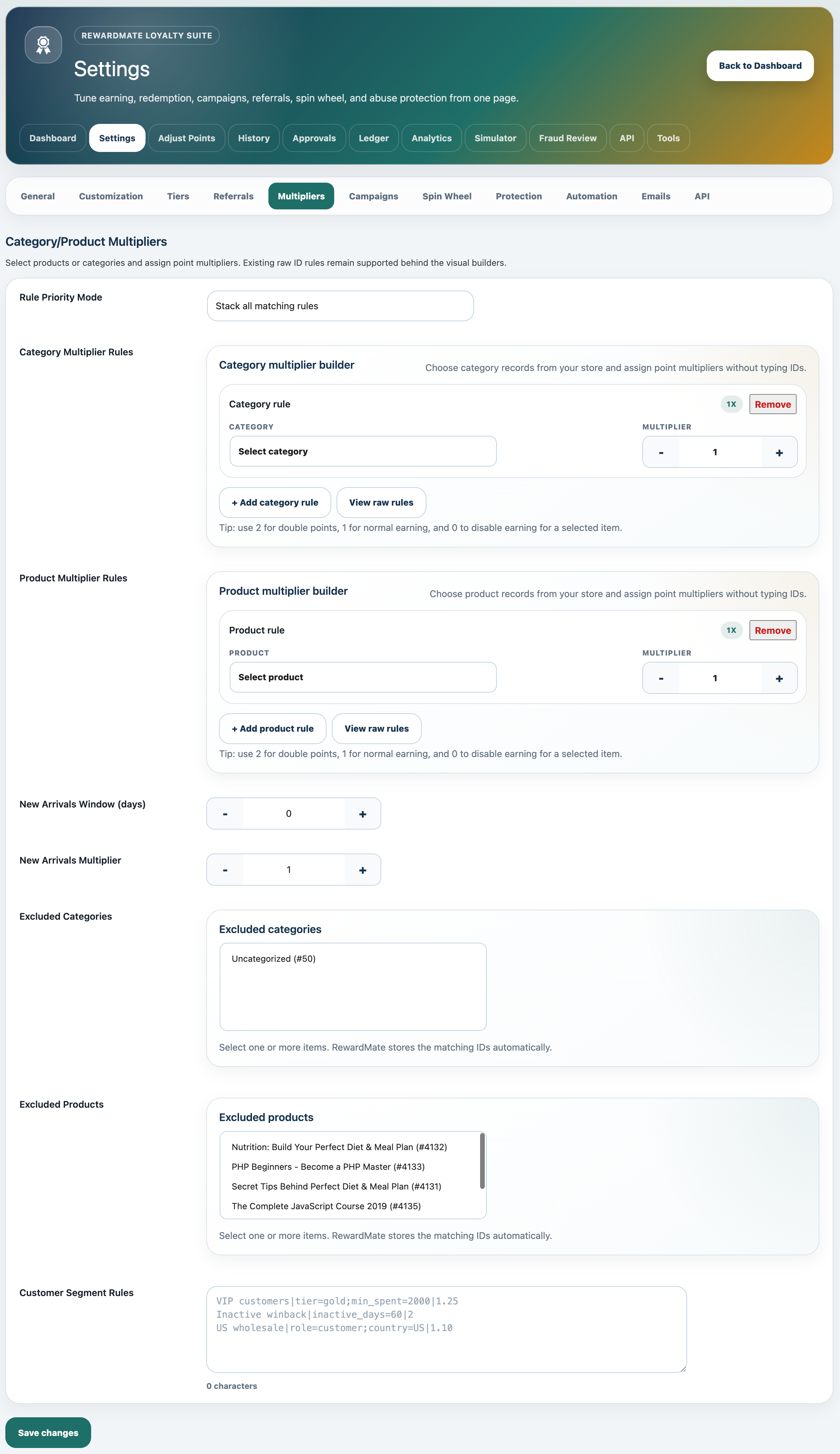
photo_camera Multipliers support category, product, new-arrival, exclusion, and segment rules. settings-multipliers.png
SettingDefaultPurposeCommon mistake
Rule Priority ModeStack all matching rulesControls how product, category, campaign, new-arrival, tier, and segment multipliers overlap.Stacking too many boosts can create unexpectedly high rewards.
Category Multiplier RulesBlankFormat category_id:multiplier. Example: 15:2.Using category names instead of IDs in raw mode.
Product Multiplier RulesBlankFormat product_id:multiplier. Example: 1001:5.Forgetting variation/product parent behavior.
New Arrivals Window0Number of days after publish date where a product receives the new-arrival multiplier.Leaving this active forever by setting too large a window.
New Arrivals Multiplier1Earn multiplier for products inside the new-arrivals window.Setting the multiplier before enabling a window.
Excluded CategoriesBlankComma-separated category IDs excluded from earning.Expecting excluded products to still earn via campaigns.
Excluded ProductsBlankComma-separated product IDs excluded from earning.Adding titles instead of IDs.
Customer Segment RulesBlankFormat Name|condition=value;condition=value|multiplier.Using unsupported conditions. Supported: role, tier, country, min_spent, min_points, max_points, inactive_days, first_time.

Good multiplier design

Use one clear reason for each boost: launch campaign, VIP retention, slow-moving category, or new-arrival promotion. Check the simulator after each rule.

Risky multiplier design

Stacking product, category, campaign, new-arrival, tier, and segment boosts without a cap can create rewards that exceed the intended promotion.

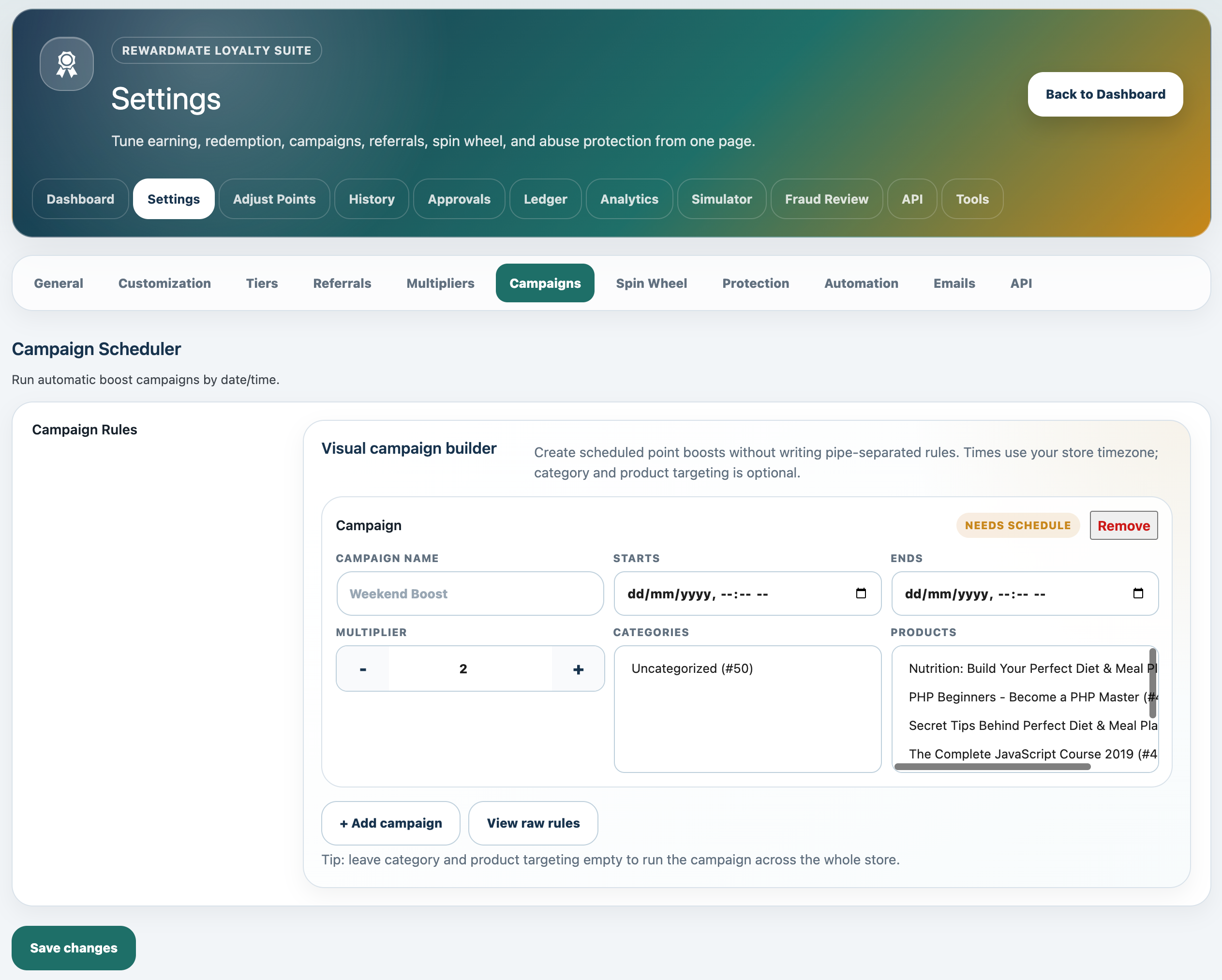
Campaign Scheduler

wp-admin/admin.php?page=rewardmate
Admin Control
Campaign settings
zoom_in Click to Zoom
photo_camera Campaigns schedule temporary point boosts with optional category or product targeting. settings-campaigns.png

Campaign format is Name|YYYY-MM-DD HH:MM|YYYY-MM-DD HH:MM|Multiplier|category_ids|product_ids. Leave category and product targeting empty to run storewide.

Black Friday Double Points|2026-11-27 00:00|2026-11-30 23:59|2||
VIP Camera Boost|2026-12-01 09:00|2026-12-07 23:59|1.5|15,27|1001,1002
Storewide campaign

Leave category and product targeting empty. Best for holidays and sitewide promotions.

Category campaign

Target category IDs. Best for seasonal collections or slow inventory groups.

Product campaign

Target product IDs. Best for a launch, bundle, or high-margin item.

Spin Wheel

wp-admin/admin.php?page=rewardmate#spin
Gamification Hub
Spin wheel settings
zoom_in Click to Zoom
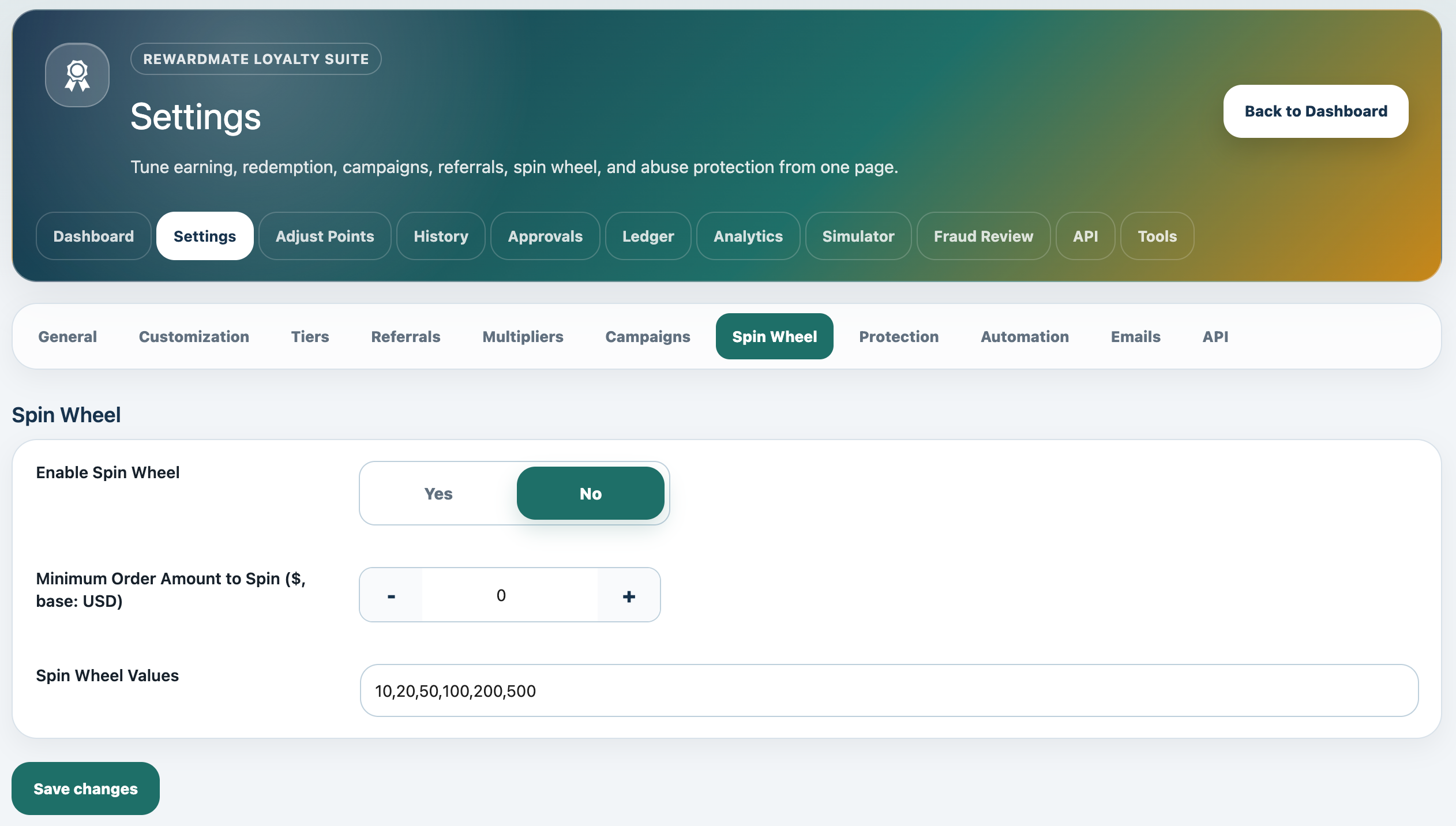
photo_camera Spin wheel settings control eligibility and allowed reward values. settings-spin.png
SettingDefaultGuidance
Enable Spin WheelNoEnable after confirming abuse limits and order eligibility.
Minimum Order Amount to Spin0Set above zero to require meaningful purchases before spins unlock.
Spin Wheel Values10,20,50,100,200,500Comma-separated allowed rewards. Backend validates submitted results against this list.

The wheel reward values are validated server-side. Customers cannot safely submit arbitrary reward values if they are not configured in the settings list.

Protection

SettingDefaultWhat it protects
Enable Abuse ProtectionYesTurns on rate limits and suspicious activity flags.
Rate-Limit Window60 minutesTime window used for check-in, spin, and referral limits.
Check-In Limit per Window3Flags excessive check-in attempts.
Spin Limit per Window5Flags excessive spin attempts.
Referral Limit per Window10Flags excessive referral events.
Cancelled/Refunded Order Alert Limit3Flags customers after this many cancelled/refunded orders in 90 days.
Shared IP Account Limit3Flags clusters of accounts registered from the same IP.
Do not disable protection during launch. Daily check-in, spin, and referral features are intentionally fun, but fun features are also the ones customers try repeatedly. Keep protection enabled unless you are debugging in staging.

Automation and Emails

wp-admin/admin.php?page=rewardmate
Admin Control
Automation settings
zoom_in Click to Zoom
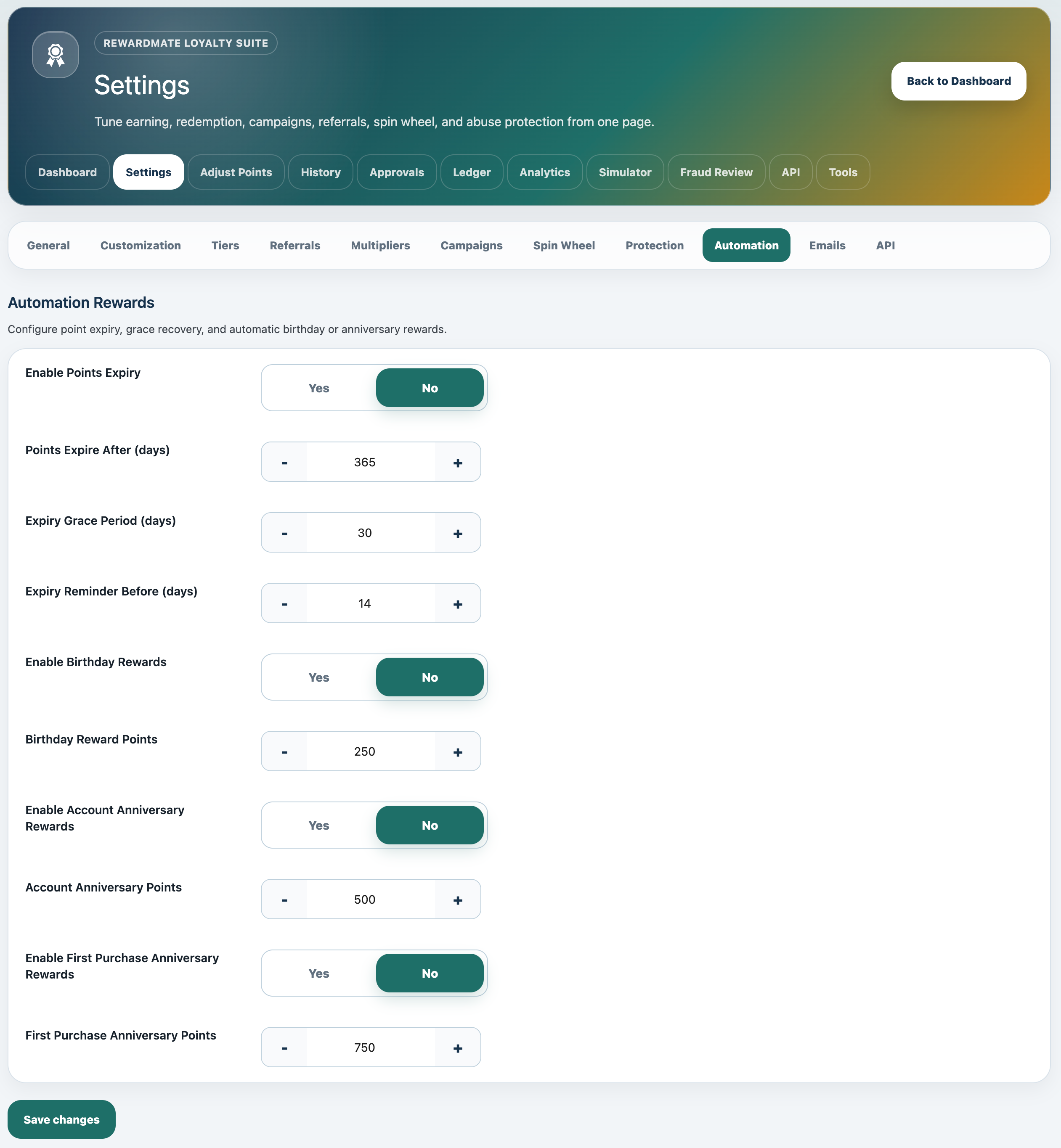
photo_camera Automation handles point expiry, grace recovery, birthday rewards, and anniversary rewards. settings-automation.png
SettingDefaultPurposeRecommendation
Enable Points ExpiryNoPositive point activity refreshes the expiry date.Enable only with clear customer communication.
Points Expire After365 daysDays before active points expire.Use 365 for annual programs; shorter windows increase urgency.
Expiry Grace Period30 daysExpired balances can be recovered when the customer completes an order.Use a grace period to reduce support frustration.
Expiry Reminder Before14 daysSends reminder if the email toggle is enabled.Pair with the expiry reminder email template.
Birthday RewardsNo / 250 pointsAwards yearly points based on the customer birthday profile field.Use for retention campaigns.
Account Anniversary RewardsNo / 500 pointsAwards yearly points on account anniversary.Good for membership-style stores.
First Purchase Anniversary RewardsNo / 750 pointsAwards yearly points on first-purchase anniversary.Useful for customer lifecycle campaigns.
wp-admin/admin.php?page=rewardmate
Admin Control
Email settings
zoom_in Click to Zoom
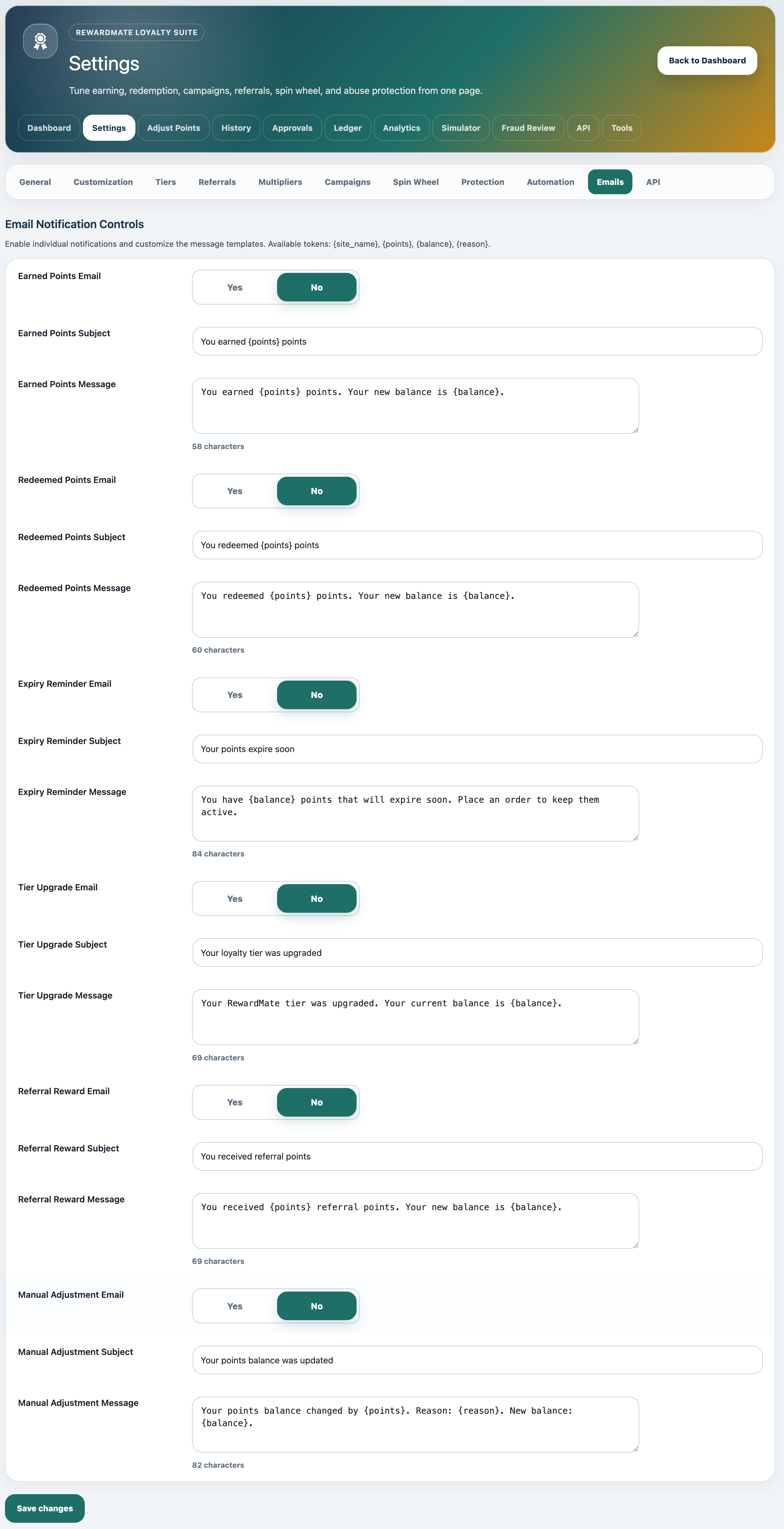
photo_camera Email settings let you enable and customize earned, redeemed, expiry, tier, referral, and manual adjustment notifications. settings-emails.png

Email templates support {site_name}, {points}, {balance}, and {reason}. Tier upgrade also receives a {tier} token from the sender.

EmailTriggerWhen to enableSuggested tone
Earned PointsPositive point activity such as purchases.Enable when customers need immediate reinforcement.Celebratory but concise.
Redeemed PointsPoints used on an order.Enable when support requests around balances are common.Receipt-like and clear.
Expiry ReminderUpcoming expiry window.Enable only if points expiry is enabled.Helpful, not threatening.
Tier UpgradeCustomer moves to a higher tier.Enable for tiered programs.Premium and appreciative.
Referral RewardReferral reward is awarded.Enable when referral program is active.Friendly and social.
Manual AdjustmentAdmin, import, API, or support adjustment.Enable if customers should be notified of manual balance changes.Plain and explanatory.

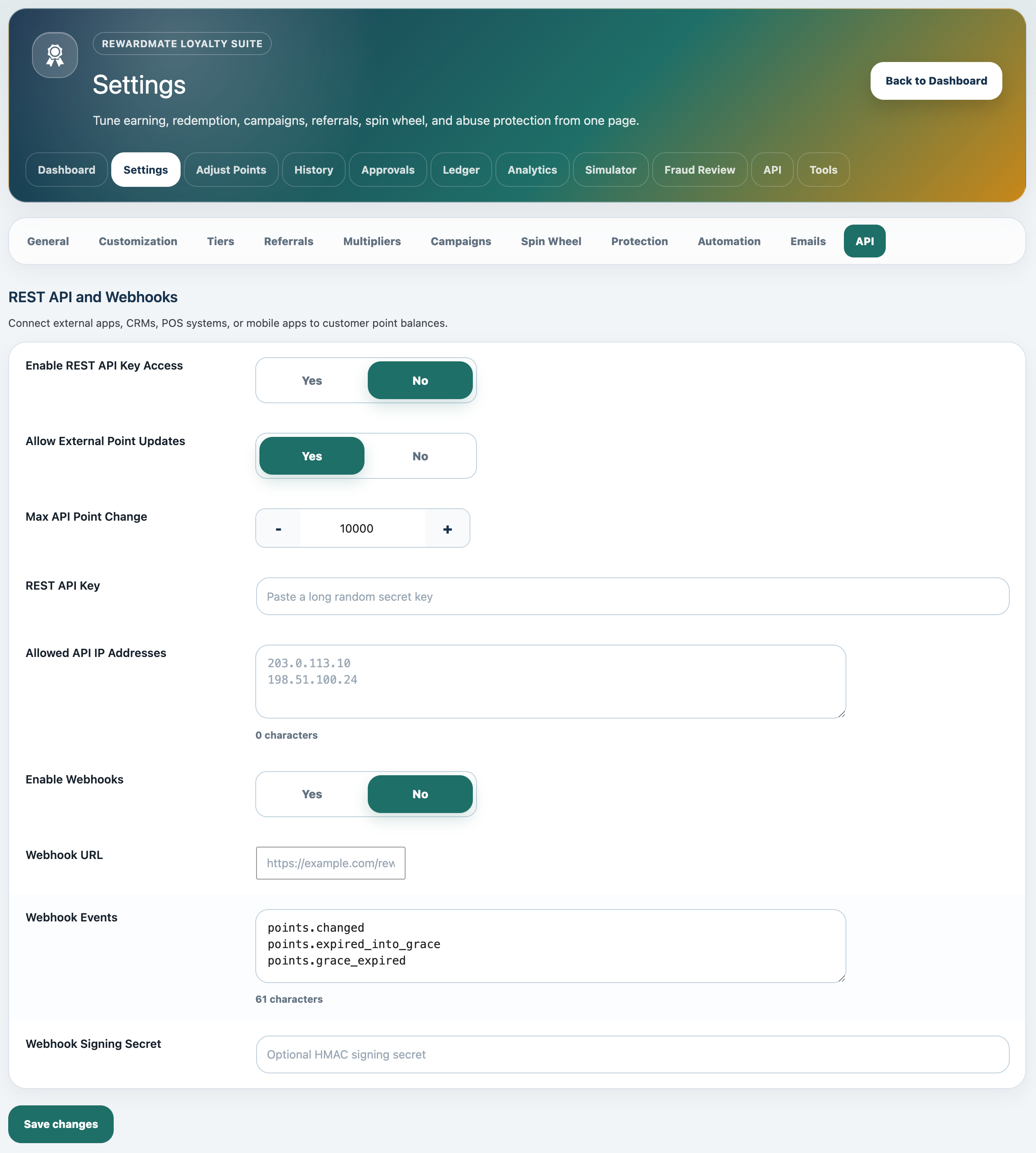
API and Webhooks Settings

wp-admin/admin.php?page=rewardmate#api
REST API
API settings
zoom_in Click to Zoom
photo_camera API settings enable key access, external writes, IP restrictions, webhooks, and signing. settings-api.png
SettingDefaultSecurity guidance
Enable REST API Key AccessNoEnable only when an external system needs access. Logged-in admins with manage_woocommerce can use the API without a key.
Allow External Point UpdatesYesDisable for reporting-only integrations.
Max API Point Change10000Keep a limit to reduce damage from bad integrations. Use 0 only for trusted internal systems.
REST API KeyBlankGenerate a long random key from RewardMate > API and send it as X-Omnify-Customer-Rewards-Key.
Allowed API IP AddressesBlankOptional allowlist. Add one IP per line or comma-separated.
Enable WebhooksNoEnable only after setting a valid HTTPS webhook URL.
Webhook URLBlankDestination for JSON event POSTs.
Webhook Eventspoints.changed, points.expired_into_grace, points.grace_expiredOne event per line. Also supports test.
Webhook Signing SecretBlankWhen set, RewardMate sends X-Omnify-Customer-Rewards-Signature using HMAC-SHA256.
📘 Merchant Guide Admin & Operations Free Core #8 • 2 min read

Admin Screens link

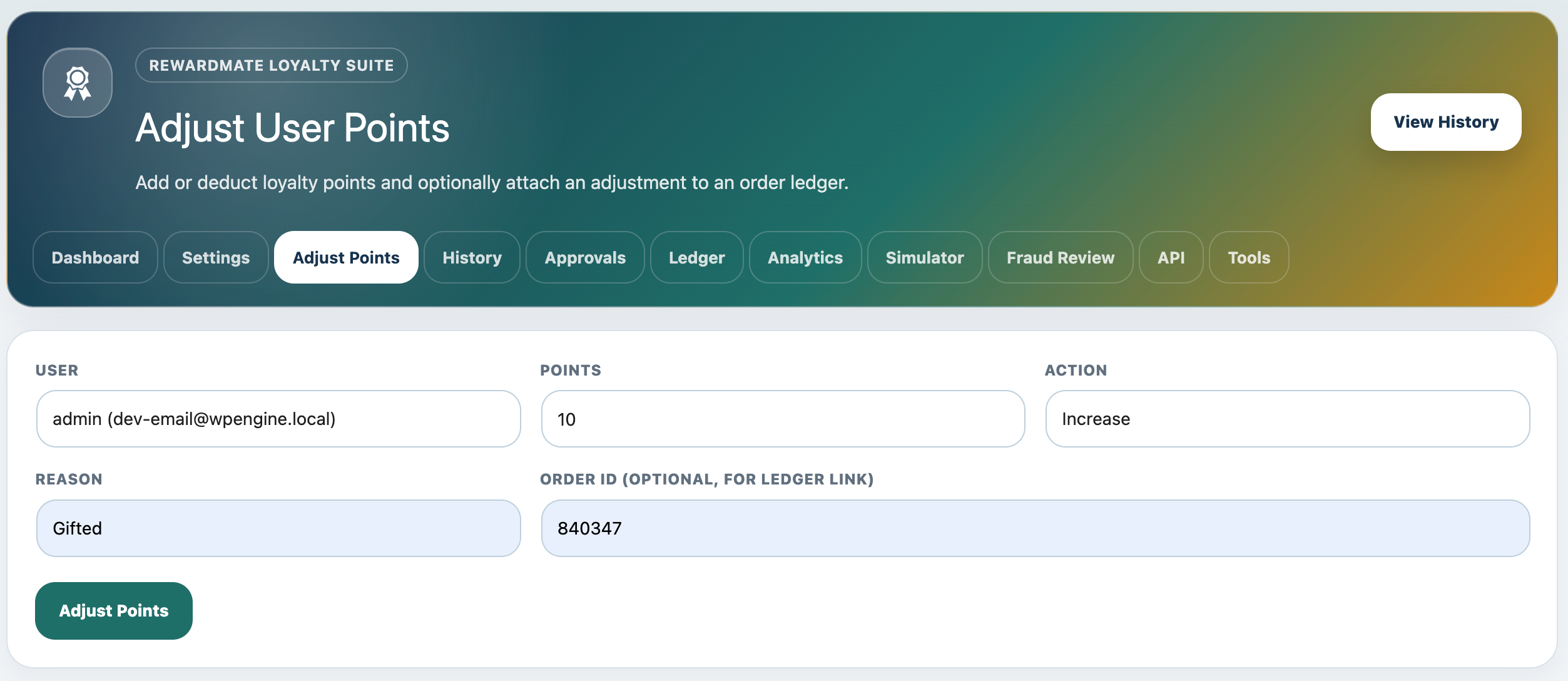
Adjust Points

Increase or decrease a user balance, add a reason, and optionally attach an order ID for ledger context.

wp-admin/admin.php?page=rewardmate
Admin Control
Adjust points
zoom_in Click to Zoom
photo_camera Adjust points adjust-points.png

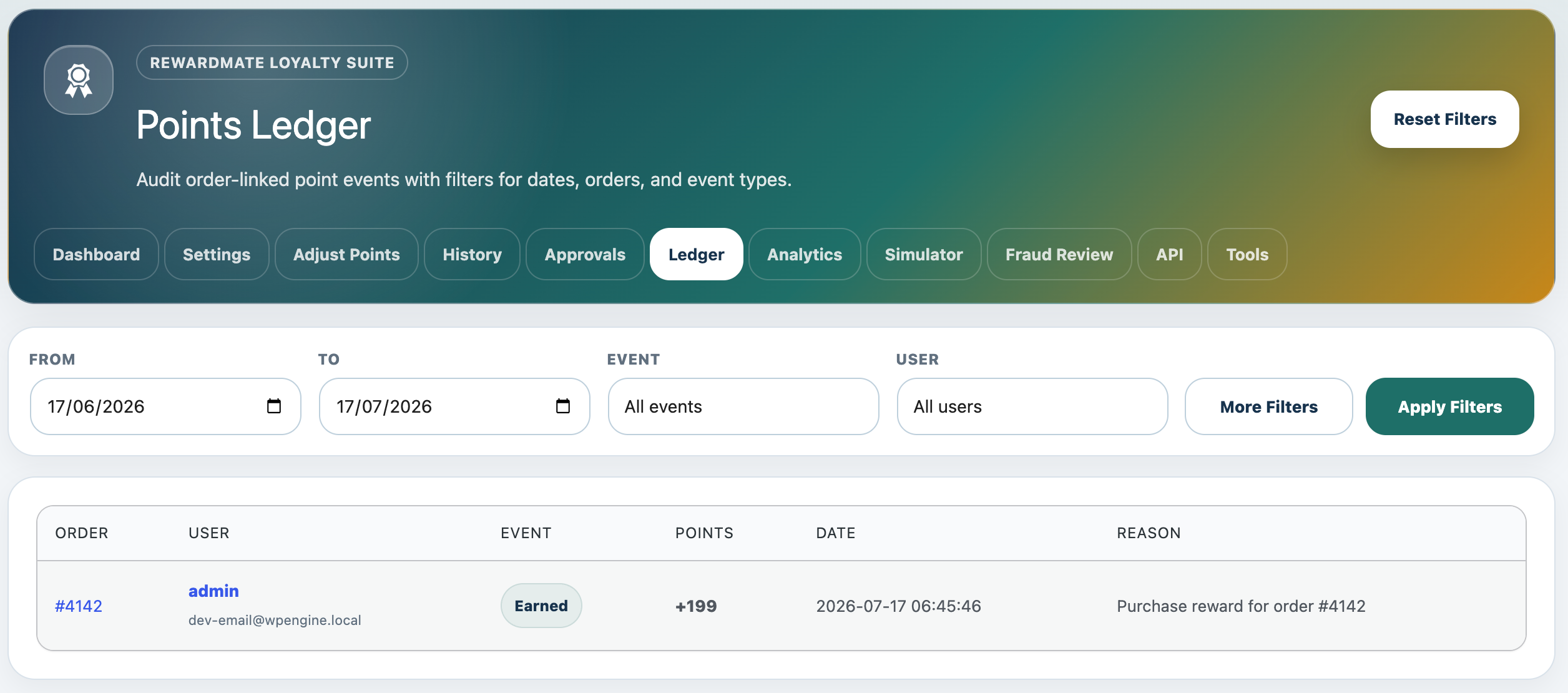
Ledger

Audit order-linked point events by date, event, user, order, and reason.

wp-admin/admin.php?page=rewardmate#ledger
Audit Log
Points ledger
zoom_in Click to Zoom
photo_camera Points ledger ledger.png

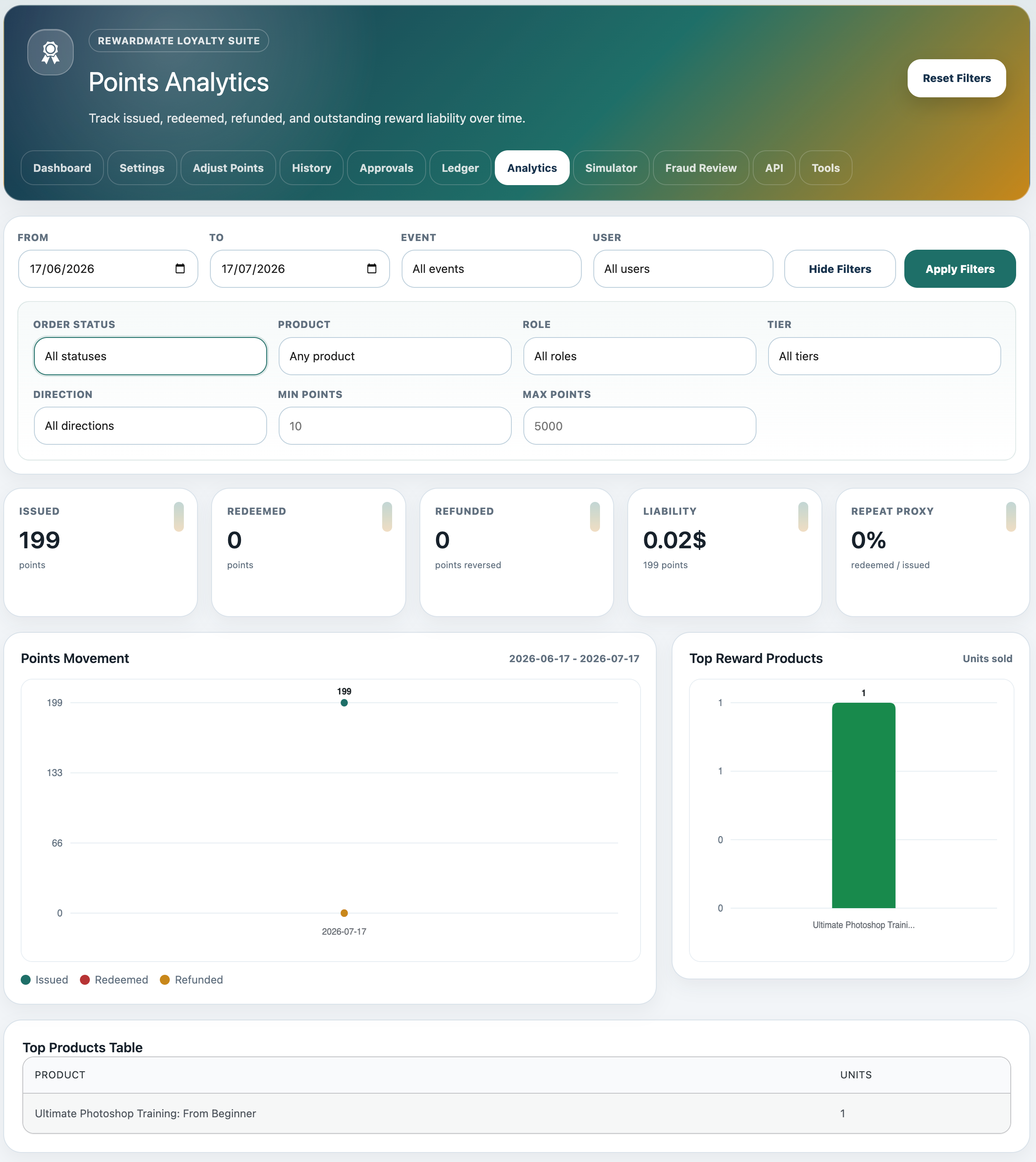
Analytics

Review issued, redeemed, refunded, liability, repeat proxy, movement charts, and top reward products.

wp-admin/admin.php?page=rewardmate#analytics
Analytics
Analytics
zoom_in Click to Zoom
photo_camera Analytics analytics.png

Rule Simulator

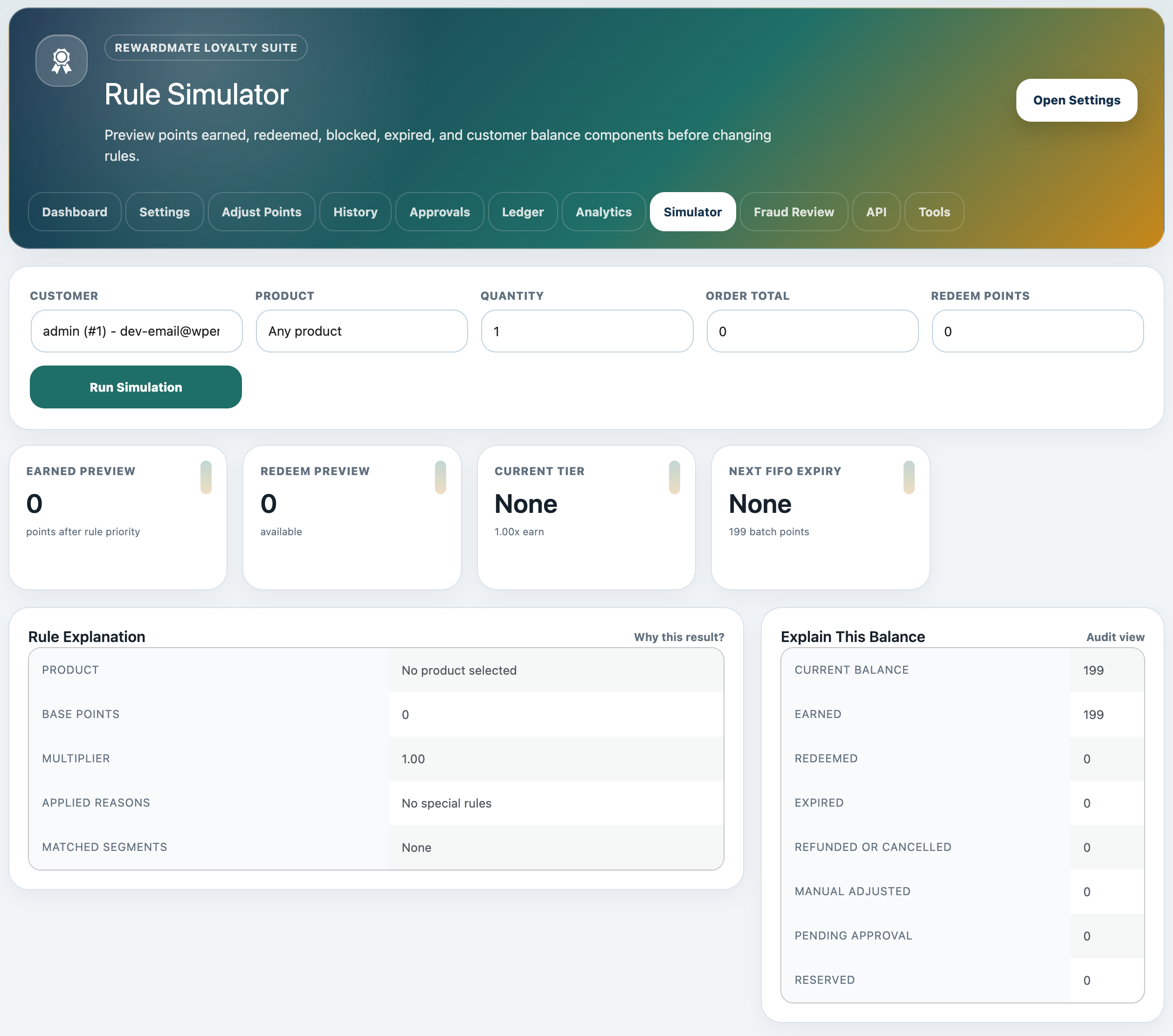
Preview earned points, redeem availability, current tier, FIFO expiry, balance explanation, and applied reasons.

wp-admin/admin.php?page=rewardmate
Admin Control
Rule simulator
zoom_in Click to Zoom
photo_camera Rule simulator simulator.png
📘 Merchant Guide Admin & Operations Free Core #9 • 2 min read

Tools, CSV, and Reports link

wp-admin/admin.php?page=rewardmate
Admin Control
RewardMate tools
zoom_in Click to Zoom
photo_camera Tools include CSV import/export, email tests, bulk point adjustment, and liability reporting. tools.png
ToolPurposeRequired columns or notes
CSV Import: BalancesSet, increase, or decrease balances for existing customers.user_id (or email / user_email / user_login), points, mode (set, increase, decrease), reason. Use dry run first. Supports 7,000+ rows with auto-chunking.
CSV Import: HistoryImport historical point rows for customer audit trail.user_id (or email / user_email / user_login), points, type, date, reason.
CSV Import: LedgerImport order-linked ledger rows.order_id,user_id,event,points,date,reason.
CSV ExportExport balances, history, or ledger.Use for migration, audit, or accounting workflows with memory-safe chunking.
Email Preview + TestPreview and send configured templates.Useful before enabling customer notifications.
Bulk Points AdjustmentApply point changes to selected users or filtered groups.Use More Filters only when targeting groups.
Point Liability ReportExport point liability by date, user, role, tier, and balance range.Use for finance reconciliation.

Safe CSV import workflow

Export current data first.
Download balances, history, and ledger CSVs before importing anything.
Run dry run.
Validate headers and rows without writing changes.
Import a small batch.
Start with one or two known users and confirm balance, history, and ledger output.
Import the full file.
After validation, import the production file and export again for reconciliation.
CSV imports are operationally sensitive. A malformed balance import can change customer balances quickly. Use dry run, keep backups, and avoid importing while a live promotion is running.

Downloadable Sample CSV Templates (v1.2.1)

To ensure error-free data formatting before running imports, RewardMate includes one-click downloadable sample CSV templates directly in the admin tools workspace:

  • sample-balances.csv: Customer balances import template with email, username, points balance, and VIP tier columns.
  • sample-history.csv: Point transaction events import template with dates, reasons, and reference order numbers.
  • sample-ledger.csv: Full audit trail import template for multi-year historical loyalty accounting.
Modern Drag & Drop: The v1.2.1 tools interface features a responsive drag & drop file zone with instant client-side file size and format validation.
📘 Merchant Guide Points & Redemption Free Core #10 • 2 min read

Purchase Rewards link

RewardMate awards purchase points when an order reaches Completed. The basic formula is line item total in base currency multiplied by Points per Purchase. If a product has a custom point value, RewardMate uses that value times quantity instead of the price ratio.

wp-admin/admin.php?page=rewardmate
Admin Control
Purchase Rewards Settings
zoom_in Click to Zoom
photo_camera Configure global points per dollar earning ratio, tax handling, and currency rounding rules. settings-general.png
wp-admin/admin.php?page=rewardmate
Admin Control
Category and Product Multipliers
zoom_in Click to Zoom
photo_camera Set up 2x or 3x bonus point multipliers for specific product categories and VIP tiers. settings-multipliers.png
Order status: Points are not awarded at checkout by default. They are awarded on woocommerce_order_status_completed, which protects against unpaid or incomplete orders.
ScenarioHow RewardMate calculatesExample
Standard productLine total multiplied by Points per Purchase, then by eligible multipliers.$199 product x 1 point per $1 = 199 base points.
Custom product pointsProduct meta overrides price-based earning.Course earns 500 fixed points even if discounted.
Excluded product or categoryMultiplier becomes zero, so no points are earned.Gift card category excluded from rewards.
Campaign or tier activeEligible multiplier is applied according to priority mode.199 base points x 2x campaign = 398 points.

Product & Variation-Level Points and Tier Exclusivity

In the WooCommerce product data panel, RewardMate adds Points for this product and Required Loyalty Tier. For variable products, these settings can also be customized on individual variations under the Variations tab.

Use custom product and variation points for: courses, subscriptions, bundles, variation-specific bonuses (e.g. VIP sizes or bundles), free gifts that should not earn points, and products whose reward value should not change when discounts are applied.
VIP Variation Gating: You can leave a standard product accessible to all customers while restricting premium or collector variations to Gold or Platinum tier members.

Refund and Cancel Behavior

Enable Decrease Points on Refund/Cancel when points should be reversed if an order is refunded or canceled. This is recommended for most stores.

📘 Merchant Guide Points & Redemption Free Core #11 • 2 min read

Checkout Redemption link

Logged-in customers with points can redeem them from cart or checkout using a slider, number input, and Apply Points button.

checkout (points-redemption)
Storefront
Checkout redemption
zoom_in Click to Zoom
photo_camera Checkout redemption shows available balance, total value, maximum redeemable points, and step size. checkout.png

RewardMate calculates the maximum redemption from available points, point value, cart subtotal, optional shipping inclusion, maximum redemption percentage, minimum points, and step size.

Max redemption logic max discount = eligible cart total * (max redemption percentage / 100) max points = floor(max discount / value per point) final points = available points capped by max points and rounded to step size

Customer flow

The customer chooses points, clicks Apply Points, sees a negative fee on the order, then places the order. RewardMate stores the intended point usage on the order and reserves or deducts points according to order status and approval rules.

Admin flow

Admins can audit redemption in the order notes, customer history, and ledger. If high redemption approval is enabled, the order is queued before the points are deducted.

Common mistake: Setting Value per 1000 points too high and Max Redemption Percentage too high can create discounts larger than your product margin.
📘 Merchant Guide Points & Redemption Free Core #12 • 2 min read

WooCommerce Integration link

checkout (points-redemption)
Storefront
WooCommerce Checkout Points Slider
zoom_in Click to Zoom
photo_camera Seamless integration with classic WooCommerce checkout, cart page, and block-based checkout fragments. checkout.png
my-account/rewardmate-wallet
Storefront Wallet
WooCommerce My Account Wallet Endpoint
zoom_in Click to Zoom
photo_camera Dedicated "Points Wallet" tab added dynamically to the WooCommerce My Account dashboard. wallet.png
WooCommerce areaRewardMate behaviorAdmin guidance
Order statusesPurchase points are awarded when an order becomes Completed.Use Completed for fulfilled/paid orders that should earn points.
Guest checkoutGuest orders do not have a user balance to update.Encourage account creation before checkout for loyalty stores.
CouponsPoints can stack with coupons only when the setting allows it.Disable stacking for aggressive coupon campaigns.
ShippingShipping can be included or excluded from redemption max calculation.Keep excluded unless shipping discounts are intentional.
Refunds/cancellationsRewardMate can reverse points when enabled.Enable reversal for most production stores.
Variable productsProduct-level point behavior depends on the stored product ID used by WooCommerce line items.Test parent and variation behavior before using fixed product points at scale.
Multi-currencyRewardMate exposes a conversion filter for custom currency handling.Connect your currency plugin through rewardmate_convert_amount.
🎮 Gamification Gamification & Customer Hub Free Core #13 • 2 min read

Customer Wallet link

RewardMate adds a Points Wallet endpoint to WooCommerce My Account. Customers can see points, reward value, current tier, referral link, reward products, and filtered history.

my-account/rewardmate-wallet
Storefront Wallet
Customer wallet
zoom_in Click to Zoom
photo_camera Points Wallet with balance, tier, referral link, and history filter. wallet.png

Wallet history supports filters for all, earned, spent, gifted, check-in, and edited entries. If reward product rules are configured, eligible gift redemption cards appear in the wallet.

Wallet areaWhat customers learnSupport benefit
Hero balanceTotal points, reward value, and tier.Customers can self-check the numbers before contacting support.
Referral linkTheir personal referral URL.Reduces confusion around how to invite others.
History tablePoint changes by type, date, and reason.Support can point customers to the exact entry.
Reward productsGift options that can be redeemed with points.Makes non-discount rewards discoverable.
🎮 Gamification Gamification & Customer Hub Free Core #14 • 2 min read

Shortcodes Reference link

RewardMate provides 6 universal shortcodes to embed points widgets, balances, and games on any page, post, or Elementor/Gutenberg layout.

my-account/rewardmate-wallet
Storefront Wallet
Shortcode: rewardmate_wallet
zoom_in Click to Zoom
photo_camera The [rewardmate_wallet] shortcode outputs the complete interactive Points Wallet dashboard on any custom Elementor or Gutenberg page. wallet.png
wp-admin/admin.php?page=rewardmate#spin
Gamification Hub
Shortcode: rewardmate_spin_wheel
zoom_in Click to Zoom
photo_camera Embed the gamified Spin-to-Win wheel anywhere on your site using [rewardmate_spin_wheel]. settings-spin.png
ShortcodeParameters & DefaultsDescription
[rewardmate_wallet] None Renders the full Points Wallet dashboard (hero balance, tier status, referral link, reward product cards, points gifting form, and transaction history).
[rewardmate_points_balance] format="number" (or "text") Displays the current customer's point balance. Format "text" outputs e.g. "1,250 points", while "number" outputs raw formatted digits.
[rewardmate_daily_checkin] None Renders the interactive Daily Check-In button with active streak counter and claim feedback. Automatically enqueues required scripts.
[rewardmate_spin_wheel] None Renders the gamified Spin-to-Win lucky wheel canvas and spin controls for eligible customers.
[rewardmate_points_history] limit="20" Displays an interactive, paginated table of the customer's point transactions with type, amount, date, and reason.
[rewardmate_referral_link] copy_button="yes" (or "no") Displays the customer's unique referral link with an optional one-click clipboard copy button.
Theme & Page Builder Friendly: All shortcodes automatically enqueue necessary CSS styles and JavaScript dependencies even when placed outside WooCommerce template files.
🎮 Gamification Gamification & Customer Hub Pro Edition #15 • 2 min read

Campaigns and Multipliers link

RewardMate can combine category multipliers, product multipliers, new-arrival boosts, scheduled campaigns, loyalty tier multipliers, and customer segment multipliers.

wp-admin/admin.php?page=rewardmate
Admin Control
Campaign Scheduler
zoom_in Click to Zoom
photo_camera Campaign Scheduler: Set automatic date windows for double points weekend, flash sales, and category boosts. settings-campaigns.png
wp-admin/admin.php?page=rewardmate
Admin Control
Multipliers Configuration
zoom_in Click to Zoom
photo_camera Configure multi-tiered multipliers for specific product categories and customer segments. settings-multipliers.png
Priority modeBehaviorUse case
Stack all matching rulesMultiplies all applicable rules together.Aggressive promotional programs with clear margin controls.
Product rules override category rulesUses product multiplier instead of category multiplier when both match, then applies campaign/new-arrival/tier/segment rules.Stores with product-specific exceptions.
Highest winsUses the highest product/category/campaign/new-arrival multiplier, then applies tier and segment multipliers.Safer promotion stacking.

Campaign examples

Double Points Weekend

Storewide 2x multiplier for a short window. Good for demand generation.

VIP Winback

Segment rule for inactive customers with a higher multiplier. Good for reactivation.

New Product Launch

Product rule or campaign targeting one product ID. Good for launch momentum.

🎮 Gamification Gamification & Customer Hub Free Core #16 • 2 min read

Daily Check-In and Spin Wheel link

Daily check-in gives logged-in customers a daily reward. Spin wheel gives bonus points from configured values and requires an eligible completed order.

wp-admin/admin.php?page=rewardmate#spin
Gamification Hub
Spin-to-Win Wheel Settings
zoom_in Click to Zoom
photo_camera Spin Wheel settings: Configure slice values, probability weights, minimum qualifying order total, and secure server-side determination. settings-spin.png

Daily Check-In

Enable it from General settings and choose the point value. RewardMate stores the last check-in date and prevents repeat claims for the same day.

Spin Wheel

Customers can spin after a qualifying completed order. RewardMate validates eligibility and allowed wheel values before awarding points.

FeatureEligibilityBest practice
Daily Check-InLogged-in customer, once per day.Keep reward small and abuse protection enabled.
Spin WheelEligible completed order and configured minimum order amount.Use varied values but keep the top prize rare enough to protect liability.
🎮 Gamification Gamification & Customer Hub Pro Edition #17 • 2 min read

Expiry and Automation link

RewardMate runs a daily maintenance task for point expiry, grace recovery, birthday rewards, account anniversary rewards, and first purchase anniversary rewards.

wp-admin/admin.php?page=rewardmate
Admin Control
Automation & Expiry Settings
zoom_in Click to Zoom
photo_camera Automated point expiry: Configure FIFO expiration periods, grace recovery windows, and inactivity alerts. settings-automation.png
wp-admin/admin.php?page=rewardmate
Admin Control
WooCommerce Branded Email Notifications
zoom_in Click to Zoom
photo_camera WooCommerce HTML branded transactional emails for points earned, expiring balances, and tier advancements. settings-emails.png

When points expire, they can move into a grace balance. If the customer completes an order during the grace period, RewardMate can recover those points and log the recovery on the order ledger.

Positive point activity occurs.
RewardMate adds a FIFO batch and refreshes the customer expiry timestamp when expiry is enabled.
Reminder window opens.
If configured, RewardMate sends an expiry reminder before the next expiry date.
Points expire into grace.
Expired points are removed from the usable balance but remain recoverable for the grace period.
Grace recovery or final expiry happens.
A completed order during grace can recover points; otherwise grace points are cleared after the grace date.
👑 VIP Pro Suite Pro Features Pro Edition #18 • 2 min read

Fraud Review link

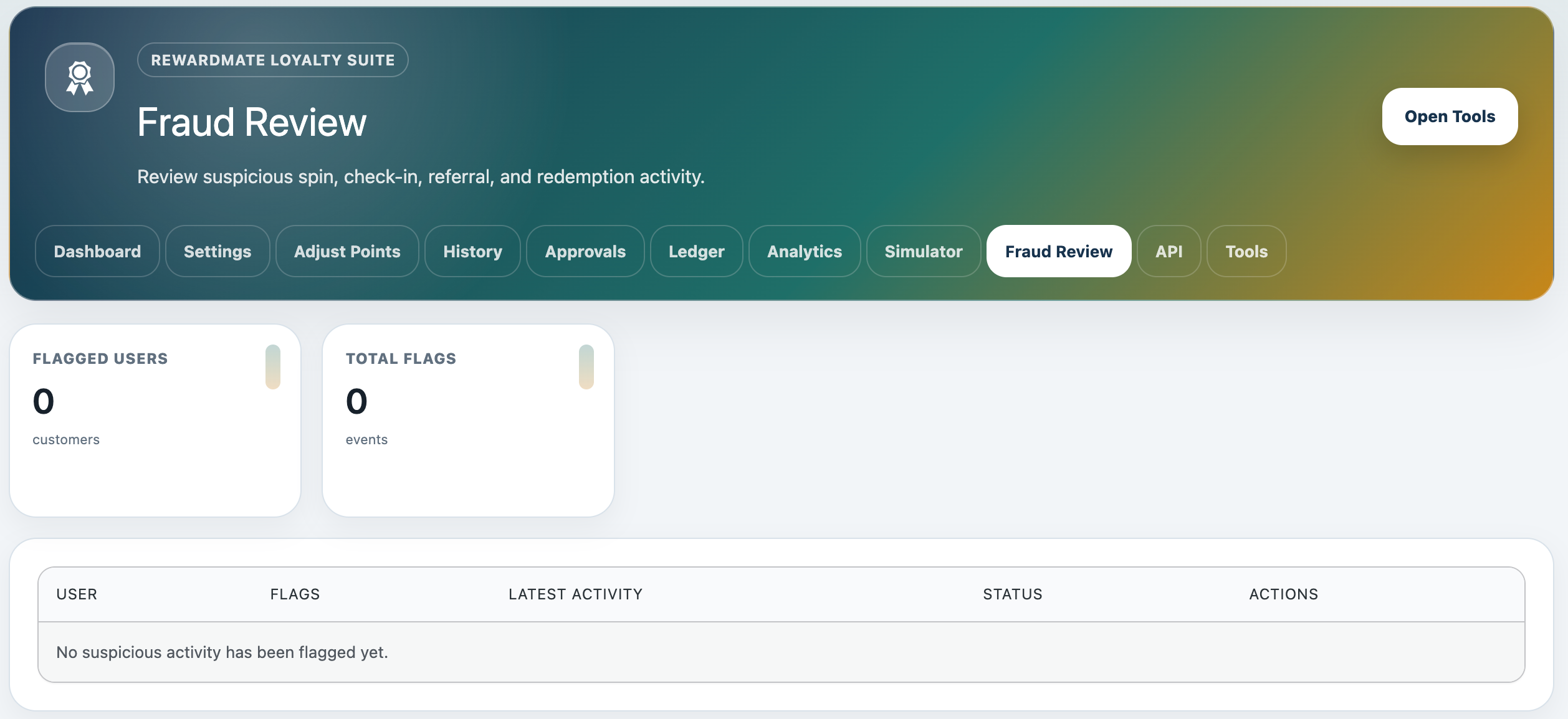
Fraud Review lists customers with suspicious activity flags. Flags can be created by rate-limit failures, high redemption pending review, insufficient points at deduction, repeated canceled/refunded orders, and shared registration IP clusters.

wp-admin/admin.php?page=rewardmate#fraud
Security & Velocity
Fraud review
zoom_in Click to Zoom
photo_camera Fraud Review summarizes flagged users and total flag count. fraud-review.png
Flag sourceWhat it may meanRecommended review
Rate limit exceededRepeated check-in, spin, or referral attempts inside the configured window.Check history and recent IP/session behavior before blocking the user.
High redemption pending reviewA customer attempted a redemption above the approval threshold.Review order value, account age, balance source, and previous refunds.
Insufficient points on deductionBalance changed before order deduction finalized.Inspect checkout timing and recent adjustments.
Cancelled/refunded order farmingMultiple refunded or canceled orders in a 90-day window.Compare order notes, payment status, and point reversals.
Shared registration IPSeveral accounts registered from one IP address.Could be abuse, a household, workplace, or shared network. Review before acting.
⚡ Developer & API Developers & API Pro Edition #19 • 2 min read

REST API link

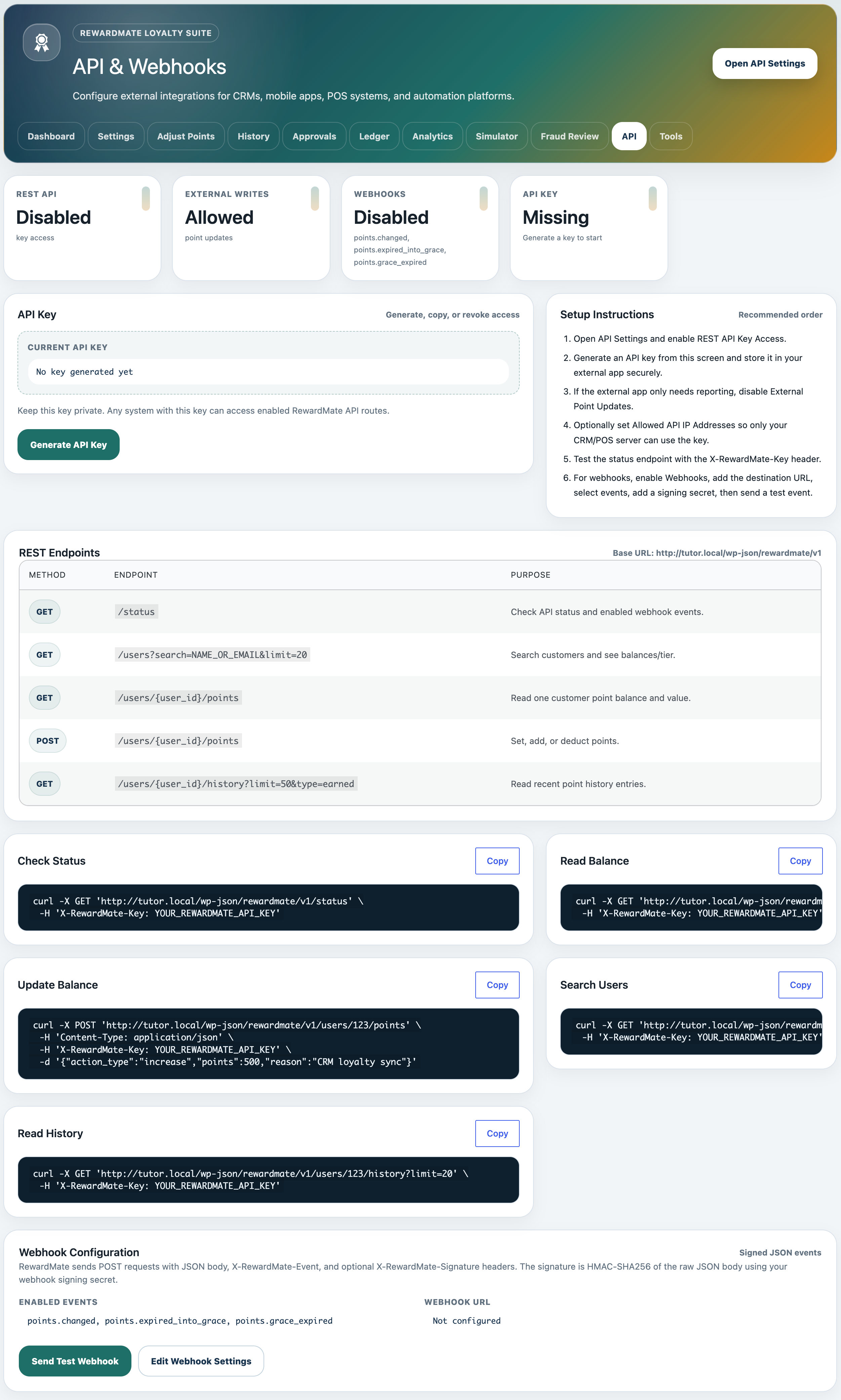
RewardMate exposes REST routes under /wp-json/rewardmate/v1. API key requests must send X-Omnify-Customer-Rewards-Key. Logged-in admins with manage_woocommerce can also authenticate through WordPress.

wp-admin/admin.php?page=rewardmate#api
REST API
RewardMate API page
zoom_in Click to Zoom
photo_camera API page with key tools, setup instructions, endpoints, cURL examples, and webhook configuration. api.png
MethodEndpointPurpose
GET/statusCheck API status and enabled webhook events.
GET/users?search=NAME_OR_EMAIL&limit=20Search customers and see balances/tier.
GET/users/{user_id}/pointsRead one customer point balance and value.
POST/users/{user_id}/pointsSet, add, or deduct points.
GET/users/{user_id}/history?limit=50&type=earnedRead recent point history entries.

cURL Examples

curl -X GET 'https://example.com/wp-json/rewardmate/v1/status' \
  -H 'X-Omnify-Customer-Rewards-Key: YOUR_REWARDMATE_API_KEY'
curl -X POST 'https://example.com/wp-json/rewardmate/v1/users/123/points' \
  -H 'Content-Type: application/json' \
  -H 'X-Omnify-Customer-Rewards-Key: YOUR_REWARDMATE_API_KEY' \
  -d '{"action_type":"increase","points":500,"reason":"CRM loyalty sync"}'

Update balance request fields

FieldAccepted valuesPurpose
action_typeincrease, decrease, setControls whether points are added, deducted, or replaced.
pointsPositive integerPoint amount to apply. External requests can be capped by Max API Point Change.
reasonStringAppears in history and helps support explain the adjustment.

Example response shape

{
  "user_id": 123,
  "points": 1200,
  "currency": "USD",
  "value": 12,
  "tier": {
    "key": "gold",
    "label": "Gold"
  }
}
Security: Store API keys in secrets management, restrict by IP when possible, set a maximum point change, and disable external writes for read-only integrations.
⚡ Developer & API Developers & API Pro Edition #20 • 2 min read

Webhooks link

When enabled, RewardMate sends JSON POST requests to the configured webhook URL. Supported events are points.changed, points.expired_into_grace, points.grace_expired, and test.

wp-admin/admin.php?page=rewardmate#api
REST API
Webhook Configuration
zoom_in Click to Zoom
photo_camera Webhooks setup: Enter endpoint URLs and secret keys to stream real-time JSON payloads for loyalty events. settings-api.png
wp-admin/admin.php?page=rewardmate#api
REST API
REST API & Webhooks
zoom_in Click to Zoom
photo_camera Developer workspace showing available webhooks: points.earned, points.redeemed, tier.changed, and fraud.flagged. api.png
{
  "event": "points.changed",
  "sent_at": "2026-07-17 10:15:00",
  "payload": {
    "user_id": 123,
    "points_delta": 500,
    "balance": 1200,
    "type": "earned",
    "reason": "Purchase reward for order #4142"
  }
}

If a signing secret is configured, verify the X-Omnify-Customer-Rewards-Signature header by computing an HMAC-SHA256 signature of the raw JSON body with the same secret.

HeaderWhen sentHow to use it
Content-Type: application/jsonEvery webhook request.Parse the body as JSON.
X-Omnify-Customer-Rewards-EventEvery webhook request.Route the request by event name.
X-Omnify-Customer-Rewards-SignatureOnly when signing secret is configured.Verify the raw body before trusting the payload.
⚡ Developer & API Developers & API Free Core #21 • 2 min read

Developer Notes link

Important Meta Keys

KeyStorageMeaning
_user_pointsUser metaCurrent point balance.
_point_historyUser metaCustomer point history rows.
_rewardmate_point_batchesUser metaFIFO batches used for expiry.
_rewardmate_reserved_pointsUser metaPoints reserved by pending orders.
_custom_product_pointsProduct metaProduct-specific fixed points.
_rewardmate_points_ledgerOrder metaOrder-linked point ledger rows.
rewardmate_has_spun_for_order_{ORDER_ID}User metaSpin usage flag per eligible order.

Currency Conversion Filter

RewardMate calls rewardmate_convert_amount when converting order amounts between order currency and store base currency.

wp-admin/admin.php?page=rewardmate
Admin Control
Rule Simulator
zoom_in Click to Zoom
photo_camera Rule Simulator providing full developer trace logs and step-by-step formula breakdown. simulator.png
wp-admin/admin.php?page=rewardmate#api
REST API
Developer REST API Workspace
zoom_in Click to Zoom
photo_camera Direct REST API endpoints with authentication keys, query parameters, and schema responses. api.png
add_filter('rewardmate_convert_amount', function ($converted, $amount, $from, $to) {
    if ($from === $to) {
        return $amount;
    }

    return my_currency_converter($amount, $from, $to);
}, 10, 4);

Implementation notes

Data ownership

RewardMate uses WordPress-native storage: options for settings, user meta for balances/history, product meta for product points, and order meta for ledgers. This keeps data portable with normal WordPress backups.

Security model

Admin screens require WooCommerce management capability, form actions use nonces, REST requests require either an authorized admin session or a configured API key, and webhook signatures are optional but recommended.

⚡ Developer & API Support & Troubleshooting Free Core #22 • 2 min read

Troubleshooting link

wp-admin/admin.php?page=rewardmate
Admin Control
Troubleshooting Tools
zoom_in Click to Zoom
photo_camera Diagnostic tools: Clear transient cache, recalculate member balances, and test email delivery. tools.png
wp-admin/admin.php?page=rewardmate#fraud
Security & Velocity
Fraud Review Queue
zoom_in Click to Zoom
photo_camera Inspect flagged accounts and check rate-limiting logs if a user cannot redeem or spin. fraud-review.png
ProblemLikely causeFix
Points are not awarded after checkout.Order is not Completed, user checked out as guest, product is excluded, or multiplier is zero.Complete the order, test with a logged-in customer, check exclusions and rule simulator.
Checkout redemption does not appear.Customer has no points, minimum threshold is not met, max redemption percentage is zero, or coupons block redemption.Check General redemption settings and cart conditions.
Wallet endpoint returns 404.Rewrite rules have not refreshed.Visit Settings > Permalinks and click Save Changes.
Spin wheel says not eligible.No qualifying completed order, minimum order amount not met, or order already used for a spin.Complete a qualifying order and test again.
Email notifications do not send.Email toggle disabled, WordPress mail not configured, or event does not map to that template.Enable the relevant email, use Tools email test, and configure SMTP.
API returns unauthorized.API key access disabled, wrong header, wrong key, or IP not allowlisted.Enable REST API Key Access, send X-Omnify-Customer-Rewards-Key, and confirm IP settings.
Liability looks too high.Point value is generous, expiry disabled, redemption cap too low, or old balances imported.Review value per 1000 points, expiry policy, exports, and analytics.

Support triage order

Identify the customer and order.
Get the user ID, order ID, date, and expected point amount.
Check history first.
History tells you what changed on the customer balance.
Check ledger second.
Ledger tells you whether an order created or consumed points.
Use the simulator.
Recreate the customer, product, quantity, order total, and redeem points to explain the result.
Adjust only after evidence.
If needed, use Adjust Points with a clear reason and order ID.
⚡ Developer & API Support & Troubleshooting Free Core #23 • 2 min read

Release Notes link

Current plugin version: 1.2.1

wp-admin/admin.php?page=rewardmate
Admin Control
RewardMate v1.2.1
zoom_in Click to Zoom
photo_camera RewardMate v1.2.1: Redesigned CSV tools, one-click downloadable sample CSV templates, checkbox styling fixes, and core-pro compatibility. dashboard.png
wp-admin/admin.php?page=rewardmate
Admin Control
Redesigned CSV Tools
zoom_in Click to Zoom
photo_camera New in v1.2.1: Modern drag & drop upload zone, structured column reference guide, and bundled sample CSV templates (balances, history, ledger). tools.png

Version 1.2.1 Highlights

  • UI: Redesigned CSV Import & Export tools with modern drag & drop upload zone, structured column reference guide, and improved layout.
  • Feature: Added downloadable sample CSV templates (sample-balances.csv, sample-history.csv, sample-ledger.csv) inside the plugin with one-click admin downloads.
  • Fix: Resolved checkbox styling conflict that caused full-width distortion in admin tool forms.
  • Fix: Prevented function redeclaration collisions between Free core and Pro add-on across affiliate onboarding and helper functions.
  • Fix: Corrected admin script enqueuing on rewardmate tools and settings pages.

Version 1.2.0 Highlights

  • Pro Activation Compatibility: Guarded core helper functions to ensure seamless activation of RewardMate Pro alongside RewardMate Free.
  • Optimized Bulk CSV Imports: Support for 7,400+ customer balance migrations with automatic execution time extension, memory limit elevation, runtime cache flushing, and matching by email, user_email, user_login, or user_id.
  • Variation-Level Loyalty Exclusivity: Restrict individual product variations to specific loyalty tiers (e.g. Silver, Gold, Platinum).
  • Embeddable Shortcodes Suite: Added 6 universal shortcodes ([rewardmate_wallet], [rewardmate_points_balance], [rewardmate_daily_checkin], [rewardmate_spin_wheel], [rewardmate_points_history], [rewardmate_referral_link]).
  • Refund Protection & Accuracy: Restores points on cancelled/refunded reward products and manual redemptions while preventing over-deductions on partial refunds.
  • Server-Side Security: Server-side outcome generation for the Spin Wheel and transient rate-limiting on check-ins, spins, referrals, and gifting.
📘 Merchant Guide Admin & Operations Free Core #24 • 6 min read

General Settings & Points Valuation link

The General Settings panel defines the foundational financial parameters of your loyalty program, including how points are earned, how much they are worth in real currency, and how they can be redeemed at checkout.

wp-admin/admin.php?page=rewardmate
Admin Control
RewardMate General Settings
zoom_in Click to Zoom
photo_camera RewardMate General Settings: Configure Points per Purchase, Value per 1,000 Points, Minimum Redeem Threshold, and Max Redemption Percentage. settings-general.png
General
wp-admin/admin.php?page=rewardmate
Admin Control
General settings
zoom_in Click to Zoom
photo_camera General settings control core earning, redemption, approvals, refund behavior, and reward products. settings-general.png
SettingDefaultWhat it doesRecommended use
Enable Daily Check-In PointsNoAllows logged-in customers to claim a daily bonus.Enable for community or repeat-visit stores. Disable for low-margin stores until abuse protection is configured.
Daily Check-In Points10Points awarded once per day when check-in is enabled.Keep small compared with purchase rewards.
Points per Purchase1Base earning ratio per one unit of store base currency.Use 1 for simple "$1 = 1 point" programs.
Value per 1000 points0.10Currency value used when points become a discount.Choose based on margin. A higher value increases liability.
Max Redemption Percentage20Caps how much of an order can be paid with points.Use 10-20% for most stores. Avoid 100% unless points are prepaid credits.
Minimum Points to Redeem0Requires a minimum balance before checkout redemption.Set a threshold to avoid tiny redemptions.
Redeem Step Size1Forces redemption increments such as 50, 100, or 500 points.Use round steps for cleaner checkout UX.
Allow Coupon + Points StackingYesAllows points discounts when coupons are already applied.Disable if coupons and points together can erase margin.
Allow Points on Shipping AmountNoIncludes shipping in max redeemable amount calculation.Keep disabled unless shipping is margin-safe.
Manual Approval for High RedemptionsNoQueues large redemptions for admin review.Enable for high-value programs or fraud-sensitive stores.
Manual Approval Threshold5000Minimum redemption size that requires approval.Set above normal order behavior to reduce admin load.
Decrease Points on Refund/CancelNoReverses earned points when orders are refunded or canceled.Enable for most production stores.
Reward Product RulesBlankLets customers redeem points for specific products using product_id|points_cost|label.Use for gifts, samples, and VIP items. Confirm stock and purchasability.

Enable purchase earning first, test checkout redemption second, then add daily check-in, spin wheel, referrals, and reward product rules one by one. This makes it easier to identify which rule produced each balance change.

How to choose point value

Work backward from your margin. If 1000 points equals $10 and a $100 order earns 100 points, the customer earns $1 in future value, before tiers or campaigns.

📘 Merchant Guide Admin & Operations Free Core #25 • 4 min read

Storefront & Design Customization link

Design Customization allows you to tailor every customer-facing widget to seamlessly match your store branding, color palette, and typography.

wp-admin/admin.php?page=rewardmate
Admin Control
RewardMate Design Customization Settings
zoom_in Click to Zoom
photo_camera Design Customization: Live color pickers, button corner radius, font options, and single product points preview badges. settings-customization.png
Customization
wp-admin/admin.php?page=rewardmate
Admin Control
Customization settings
zoom_in Click to Zoom
photo_camera Customization settings apply to admin screens, customer wallet, charts, buttons, notices, and the spin wheel. settings-customization.png
SettingDefaultPurpose and advice
Primary Brand Color#1f6f68Primary buttons, active states, wallet accents, charts, and spin wheel. Use a high-contrast brand color.
Header Gradient Start#17324dDark hero gradient and high-contrast elements. Keep dark enough for white text.
Accent Color#c88719Badges, highlights, and secondary chart lines. Avoid colors that imply errors unless intentional.
Text Color#17212bMain readable text. Test against surface color.
Surface Color#ffffffCards, panels, tables, and form surfaces.
Card Corner Roundness22Controls card and table radius. Accepted range: 8-36.
Button Corner Roundness16Controls button shape. Accepted range: 4-32.
Header Gradient Angle135Changes gradient direction. Use 135 for the default diagonal style.
Content Width1240Max width for admin and wallet blocks. Accepted range: 720-1600.
Show Decorative Accent StripYesShows slim accent lines on RewardMate cards and wallet sections.
Design advice: Use the customization tab to make RewardMate feel native to your store, but keep contrast high. The customer wallet and checkout redemption controls need to stay readable on small screens.
👑 VIP Pro Suite Pro Features Pro Edition #26 • 5 min read

VIP Loyalty Tiers & Tier-Exclusive Products link

VIP Loyalty Tiers reward your most engaged and valuable shoppers with escalated earn rates, exclusive perks, VIP Free Shipping, and private catalog access.

wp-admin/admin.php?page=rewardmate#tiers
VIP Tiers
VIP Loyalty Tiers Settings
zoom_in Click to Zoom
photo_camera RewardMate Tiers: Configure thresholds, points multipliers, VIP Free Shipping, and per-variation tier access. settings-tiers.png
Tiers
wp-admin/admin.php?page=rewardmate#tiers
VIP Tiers
Tier settings
zoom_in Click to Zoom
photo_camera Tier rules create spend-based loyalty levels with custom earn multipliers. settings-tiers.png

Tier rules use the format Tier name|Spend threshold|Earn multiplier. Customers automatically receive the highest tier whose threshold is less than or equal to their total WooCommerce spend.

Silver|500|1.10
Gold|2000|1.25
Platinum|5000|1.50
Best practice: Keep thresholds achievable but profitable. A multiplier of 1.25 means the customer earns 25% more points than the base purchase rule.
Tier patternExampleGood forWatch out for
Low threshold, small multiplierSilver at 500 spend / 1.1xEncouraging second purchases.Customers may reach it quickly, so forecast liability.
Mid threshold, meaningful multiplierGold at 2000 spend / 1.25xRewarding loyal customers without creating VIP operations.Stacking with campaigns can become generous.
High threshold, premium multiplierPlatinum at 5000 spend / 1.5xHigh-LTV customers and membership-style programs.Needs margin review and clear customer communication.
📘 Merchant Guide Admin & Operations Pro Edition #27 • 6 min read

Multipliers & Exclusions Engine link

The Multipliers engine allows store owners to reward specific behaviors—such as buying high-margin categories or new arrivals—without permanently changing base store rates.

wp-admin/admin.php?page=rewardmate
Admin Control
Multipliers & Exclusions
zoom_in Click to Zoom
photo_camera RewardMate Multipliers: Category rules, product rules, exclusion toggles, and calculation stacking priorities. settings-multipliers.png
Multipliers and Exclusions
wp-admin/admin.php?page=rewardmate
Admin Control
Multiplier settings
zoom_in Click to Zoom
photo_camera Multipliers support category, product, new-arrival, exclusion, and segment rules. settings-multipliers.png
SettingDefaultPurposeCommon mistake
Rule Priority ModeStack all matching rulesControls how product, category, campaign, new-arrival, tier, and segment multipliers overlap.Stacking too many boosts can create unexpectedly high rewards.
Category Multiplier RulesBlankFormat category_id:multiplier. Example: 15:2.Using category names instead of IDs in raw mode.
Product Multiplier RulesBlankFormat product_id:multiplier. Example: 1001:5.Forgetting variation/product parent behavior.
New Arrivals Window0Number of days after publish date where a product receives the new-arrival multiplier.Leaving this active forever by setting too large a window.
New Arrivals Multiplier1Earn multiplier for products inside the new-arrivals window.Setting the multiplier before enabling a window.
Excluded CategoriesBlankComma-separated category IDs excluded from earning.Expecting excluded products to still earn via campaigns.
Excluded ProductsBlankComma-separated product IDs excluded from earning.Adding titles instead of IDs.
Customer Segment RulesBlankFormat Name|condition=value;condition=value|multiplier.Using unsupported conditions. Supported: role, tier, country, min_spent, min_points, max_points, inactive_days, first_time.

Good multiplier design

Use one clear reason for each boost: launch campaign, VIP retention, slow-moving category, or new-arrival promotion. Check the simulator after each rule.

Risky multiplier design

Stacking product, category, campaign, new-arrival, tier, and segment boosts without a cap can create rewards that exceed the intended promotion.

👑 VIP Pro Suite Pro Features Pro Edition #28 • 4 min read

Promotional Campaign Scheduler link

The Campaign Scheduler allows merchants to plan and automate seasonal events in advance. RewardMate activates and deactivates multipliers at exact calendar timestamps.

wp-admin/admin.php?page=rewardmate
Admin Control
Campaign Scheduler
zoom_in Click to Zoom
photo_camera Campaign Scheduler: Start and end datetime pickers, campaign multiplier rate, banner notices, and targeted categories. settings-campaigns.png
Campaign Scheduler
wp-admin/admin.php?page=rewardmate
Admin Control
Campaign settings
zoom_in Click to Zoom
photo_camera Campaigns schedule temporary point boosts with optional category or product targeting. settings-campaigns.png

Campaign format is Name|YYYY-MM-DD HH:MM|YYYY-MM-DD HH:MM|Multiplier|category_ids|product_ids. Leave category and product targeting empty to run storewide.

Black Friday Double Points|2026-11-27 00:00|2026-11-30 23:59|2||
VIP Camera Boost|2026-12-01 09:00|2026-12-07 23:59|1.5|15,27|1001,1002
Storewide campaign

Leave category and product targeting empty. Best for holidays and sitewide promotions.

Category campaign

Target category IDs. Best for seasonal collections or slow inventory groups.

Product campaign

Target product IDs. Best for a launch, bundle, or high-margin item.

🎮 Gamification Gamification & Customer Hub Free Core #29 • 4 min read

Spin-to-Win Wheel & Gamification Rules link

Gamified rewards keep customers coming back between purchases. The Spin-to-Win wheel rewards shoppers with bonus points, cart discount coupons, or free shipping vouchers.

wp-admin/admin.php?page=rewardmate#spin
Gamification Hub
Spin Wheel Settings
zoom_in Click to Zoom
photo_camera Spin Wheel settings: Slice values, probability weights, minimum qualifying order total, and secure server-side determination. settings-spin.png
Spin Wheel
wp-admin/admin.php?page=rewardmate#spin
Gamification Hub
Spin wheel settings
zoom_in Click to Zoom
photo_camera Spin wheel settings control eligibility and allowed reward values. settings-spin.png
SettingDefaultGuidance
Enable Spin WheelNoEnable after confirming abuse limits and order eligibility.
Minimum Order Amount to Spin0Set above zero to require meaningful purchases before spins unlock.
Spin Wheel Values10,20,50,100,200,500Comma-separated allowed rewards. Backend validates submitted results against this list.

The wheel reward values are validated server-side. Customers cannot safely submit arbitrary reward values if they are not configured in the settings list.

👑 VIP Pro Suite Pro Features Pro Edition #30 • 7 min read

Point Expiry, Milestones & Automation link

Point liability grows as balances accumulate. RewardMate Automation enforces FIFO (first-in, first-out) expiration and sends automated reminders to re-engage lapsed customers.

wp-admin/admin.php?page=rewardmate
Admin Control
Automation & Expiry Settings
zoom_in Click to Zoom
photo_camera Automation settings: Set expiration lifespans (e.g. 365 days), grace periods, and automated milestone triggers. settings-automation.png
Automation and Emails
wp-admin/admin.php?page=rewardmate
Admin Control
Automation settings
zoom_in Click to Zoom
photo_camera Automation handles point expiry, grace recovery, birthday rewards, and anniversary rewards. settings-automation.png
SettingDefaultPurposeRecommendation
Enable Points ExpiryNoPositive point activity refreshes the expiry date.Enable only with clear customer communication.
Points Expire After365 daysDays before active points expire.Use 365 for annual programs; shorter windows increase urgency.
Expiry Grace Period30 daysExpired balances can be recovered when the customer completes an order.Use a grace period to reduce support frustration.
Expiry Reminder Before14 daysSends reminder if the email toggle is enabled.Pair with the expiry reminder email template.
Birthday RewardsNo / 250 pointsAwards yearly points based on the customer birthday profile field.Use for retention campaigns.
Account Anniversary RewardsNo / 500 pointsAwards yearly points on account anniversary.Good for membership-style stores.
First Purchase Anniversary RewardsNo / 750 pointsAwards yearly points on first-purchase anniversary.Useful for customer lifecycle campaigns.
wp-admin/admin.php?page=rewardmate
Admin Control
Email settings
zoom_in Click to Zoom
photo_camera Email settings let you enable and customize earned, redeemed, expiry, tier, referral, and manual adjustment notifications. settings-emails.png

Email templates support {site_name}, {points}, {balance}, and {reason}. Tier upgrade also receives a {tier} token from the sender.

EmailTriggerWhen to enableSuggested tone
Earned PointsPositive point activity such as purchases.Enable when customers need immediate reinforcement.Celebratory but concise.
Redeemed PointsPoints used on an order.Enable when support requests around balances are common.Receipt-like and clear.
Expiry ReminderUpcoming expiry window.Enable only if points expiry is enabled.Helpful, not threatening.
Tier UpgradeCustomer moves to a higher tier.Enable for tiered programs.Premium and appreciative.
Referral RewardReferral reward is awarded.Enable when referral program is active.Friendly and social.
Manual AdjustmentAdmin, import, API, or support adjustment.Enable if customers should be notified of manual balance changes.Plain and explanatory.
👑 VIP Pro Suite Pro Features Pro Edition #31 • 4 min read

WooCommerce Branded Transactional Emails link

Keep your loyalty program top-of-mind with beautiful, branded HTML transactional emails that integrate seamlessly with WooCommerce's native mailer.

wp-admin/admin.php?page=rewardmate
Admin Control
WooCommerce Branded Emails
zoom_in Click to Zoom
photo_camera RewardMate Email settings: Enable/disable individual triggers, customize email subject lines, and preview WooCommerce branded templates. settings-emails.png

Supported Transactional Email Triggers

Email TriggerWhen it FiresRecipientTemplate Purpose
Points EarnedOrder transitions to Completed or Processing.CustomerNotifies shopper of points credited and displays their updated wallet total.
Points RedeemedOrder placed with discount applied.CustomerReceipt confirming points deduction and remaining balance.
Points Expiring Soon30, 14, or 7 days prior to FIFO expiration.CustomerUrgent call-to-action reminding customer to redeem points before forfeit.
VIP Tier UnlockedCustomer crosses threshold for Silver, Gold, or Platinum.CustomerCelebrates advancement and lists unlocked perks (e.g. VIP Free Shipping).
Points Gift ReceivedA friend transfers points via email.RecipientNotifies recipient of gift with sender note and login link.
High Redemption Admin AlertA redemption exceeds the manual approval threshold.Store AdminAlerts risk team to approve or reject the redemption queue item.

WooCommerce Branded Template Wrapper

All transactional emails use WC()->mailer()->wrap_message(). This ensures that your WooCommerce logo, header color, footer credits, and base styling automatically apply to every RewardMate email notification without separate configuration.

⚡ Developer & API Developers & API Pro Edition #32 • 5 min read

REST API Keys & Abuse Protection link

The API & Abuse Protection settings panel enables enterprise headless integrations, POS connections, mobile app synchronization, and anti-fraud velocity safeguards.

wp-admin/admin.php?page=rewardmate#api
REST API
API & Abuse Protection Settings
zoom_in Click to Zoom
photo_camera REST API credentials, webhook endpoints, and velocity thresholds to block automated bot exploits. settings-api.png
API and Webhooks Settings
wp-admin/admin.php?page=rewardmate#api
REST API
API settings
zoom_in Click to Zoom
photo_camera API settings enable key access, external writes, IP restrictions, webhooks, and signing. settings-api.png
SettingDefaultSecurity guidance
Enable REST API Key AccessNoEnable only when an external system needs access. Logged-in admins with manage_woocommerce can use the API without a key.
Allow External Point UpdatesYesDisable for reporting-only integrations.
Max API Point Change10000Keep a limit to reduce damage from bad integrations. Use 0 only for trusted internal systems.
REST API KeyBlankGenerate a long random key from RewardMate > API and send it as X-Omnify-Customer-Rewards-Key.
Allowed API IP AddressesBlankOptional allowlist. Add one IP per line or comma-separated.
Enable WebhooksNoEnable only after setting a valid HTTPS webhook URL.
Webhook URLBlankDestination for JSON event POSTs.
Webhook Eventspoints.changed, points.expired_into_grace, points.grace_expiredOne event per line. Also supports test.
Webhook Signing SecretBlankWhen set, RewardMate sends X-Omnify-Customer-Rewards-Signature using HMAC-SHA256.
📘 Merchant Guide Admin & Operations Free Core #33 • 4 min read

Adjust Points Manual Tool link

The Adjust Points admin tool allows store administrators to manually credit or debit points on any customer account, with a mandatory or custom reason logged directly to the audit ledger.

wp-admin/admin.php?page=rewardmate
Admin Control
Adjust Points admin screen
zoom_in Click to Zoom
photo_camera RewardMate Adjust Points screen showing user search, adjustment mode, point value, order ID reference, and reason logger. adjust-points.png

When to Use Manual Adjustments

  • Customer Care Goodwill: Award complimentary bonus points to resolve a customer support ticket or shipping delay.
  • Offline Events: Credit loyalty points for in-person purchases, trade shows, or pop-up boutique activations.
  • Account Corrections: Fix erroneous balances resulting from manual refunds or external accounting disputes.

Step-by-Step Operator Instructions

  1. Navigate to WooCommerce > RewardMate > Adjust Points in the WordPress admin sidebar.
  2. Search for the customer by name, email, or user login. The system displays current points and lifetime stats.
  3. Select the Adjustment Mode: Add Points, Deduct Points, or Set Exact Balance.
  4. Enter the number of points to apply. Positive numbers credit; negative or deduct debits.
  5. (Optional) Enter the related Order ID for financial cross-referencing.
  6. Enter a descriptive Reason (e.g. "Support credit for delayed delivery #1042"). This is stored in user meta and shown on the customer wallet.
  7. Click Apply Adjustment. The customer wallet and transactional ledger update in real time.
📘 Merchant Guide Admin & Operations Pro Edition #34 • 5 min read

Points Ledger & Audit History link

The RewardMate Points Ledger maintains an immutable financial audit trail of every point earned, redeemed, expired, gifted, or refunded across your WooCommerce store.

wp-admin/admin.php?page=rewardmate#ledger
Audit Log
Points Ledger
zoom_in Click to Zoom
photo_camera Points Ledger displaying chronological event timestamps, customer identity, order references, net points change, and operational reasons. ledger.png

Audited Ledger Fields

ColumnDescriptionDatabase Storage
Date & TimeExact UTC timestamp of the transaction event.date
Event TypeClassification (Purchase Earn, Checkout Redemption, Daily Check-In, Spin Win, Manual Adjustment, Refund Reversal, Gifting).event_type
UserCustomer username and email address linked to the WordPress user ID.user_id
Order IDClickable link to the corresponding WooCommerce order if applicable.order_id
Points DeltaPositive (+) or negative (-) change in points.points_delta
ReasonSystem or administrator description explaining the transaction trigger.reason
📘 Merchant Guide Admin & Operations Free Core #35 • 5 min read

Loyalty Analytics & Performance link

RewardMate Analytics provides executive clarity on program profitability, points velocity, liability exposure, and repeat customer retention.

wp-admin/admin.php?page=rewardmate#analytics
Analytics
Loyalty Analytics
zoom_in Click to Zoom
photo_camera RewardMate Analytics dashboard with point movement time-series, financial liability calculator, and top redeemed products. analytics.png

Key Analytics Metrics

Issued Points Volume

Total points granted over 7, 30, 90, or 365 days. Monitors promotional generosity and campaign spikes.

Redemption Adoption

Total points burned for checkout discounts or reward products. Measures member engagement.

Outstanding Liability

Estimated dollar value of unspent points across all customer wallets for balance sheet forecasting.

Repeat Buyer Rate

Percentage of points program members who placed 2 or more orders compared to non-members.

📘 Merchant Guide Admin & Operations Pro Edition #36 • 4 min read

Rule Simulator & Debugger link

The Rule Simulator allows store administrators to debug complex point calculations, category multipliers, and VIP tier perks before pushing changes live to customers.

wp-admin/admin.php?page=rewardmate
Admin Control
Rule Simulator
zoom_in Click to Zoom
photo_camera RewardMate Rule Simulator showing dynamic customer selection, mock cart items, calculated points breakdown, and rule evaluation trace. simulator.png

What the Simulator Evaluates

  • Base Purchase Points: Tests your global points-per-dollar ratio against subtotal and tax settings.
  • Category & Product Multipliers: Verifies whether stacked promotions (e.g. 2x apparel + 3x weekend flash sale) calculate highest or cumulative rewards.
  • VIP Tier Exclusivity: Confirms that gated products and free shipping perks correctly unlock only for eligible tier members.
  • Checkout Slider Limits: Verifies minimum order thresholds and maximum discount caps.
🎮 Gamification Gamification & Customer Hub Free Core #37 • 4 min read

Daily Check-in & Streaks link

Daily check-in brings customers back between purchases. Streaks reward consistency with milestone bonuses, dynamic streak recalculation, and transient lock protection.

wp-admin/admin.php?page=rewardmate#spin
Gamification Hub
Daily Check-In & Spin Wheel Settings
zoom_in Click to Zoom
photo_camera RewardMate Gamification Settings: Configure Daily Check-In Points, streak multiplier milestones, and transient lock protection. settings-spin.png

Enable Daily Check-in

In WooCommerce > Settings > RewardMate, enable Daily Check-In Points and set the points awarded per check-in (e.g. 10).

my-account/rewardmate-wallet
Storefront Wallet
Customer Points Wallet Daily Check-In View
zoom_in Click to Zoom
photo_camera Customer Points Wallet: Claim daily streak points and track current consecutive check-in streak. wallet.png

Streaks Architecture & Milestones

  • Consecutive Daily Check-Ins: Build a streak counter prominently displayed on the customer Points Wallet dashboard.
  • Milestone Bonuses: Configure streak length and completion bonus (e.g. 7 consecutive days → +50 bonus points).
  • Dynamic Recalculation (v1.2.0): Streak counts recalculate dynamically when previous days are missed to avoid showing stale or frozen numbers.
  • Audit Ledger: Every check-in event logs an audit trail entry in the customer's point history and merchant ledger.

Configuration Reference

OptionDefaultDescription & Strategy
Enable Daily Check-In PointsEnabledToggles the daily check-in feature on storefront widgets and customer wallet.
Daily Check-In Points10Base points credited to customer on initial check-in of a day.
Streak Milestones7 Days (+50 pts)Award bonus lump-sum points when shoppers maintain consecutive daily check-ins.
Case Sensitivity FixStandardizedSetting evaluation is case-insensitive to avoid disabled states from casing variations.

Embedding via Shortcode

You can embed the standalone daily check-in button anywhere on your site, landing pages, or Elementor templates using:

Code Reference
[rewardmate_daily_checkin]

Security & Abuse Prevention (v1.2.0)

Enforced daily check-in feature toggle check on AJAX endpoints with transient lock protection. Check-in attempts are restricted to one valid execution per customer user ID per calendar day (UTC midnight reset).

🎮 Gamification Gamification & Customer Hub Free Core #38 • 4 min read

Spin Wheel Gamification link

The Spin-to-Win wheel rewards shoppers with bonus points, cart discount coupons, or free shipping vouchers following qualifying completed orders.

wp-admin/admin.php?page=rewardmate#spin
Gamification Hub
Spin Wheel Gamification
zoom_in Click to Zoom
photo_camera Lucky Spin Wheel: Slice configuration, probability weights, and minimum order thresholds. settings-spin.png
my-account/rewardmate-wallet
Storefront Wallet
Spin Wheel Gamification
zoom_in Click to Zoom
photo_camera Customer Points Wallet: Spin Wheel launch trigger and reward notification. wallet.png

Detailed Walkthrough

Spin wheel gives bonus points from configured values and requires an eligible completed order with server-side outcome determination.

🎮 Gamification Gamification & Customer Hub Free Core #39 • 4 min read

Customer Points Wallet link

RewardMate adds a dedicated Points Wallet tab endpoint to the WooCommerce My Account dashboard in the free core edition.

my-account/rewardmate-wallet
Storefront Wallet
Customer Points Wallet
zoom_in Click to Zoom
photo_camera Customer Points Wallet endpoint on WooCommerce My Account dashboard. wallet.png
wp-admin/admin.php?page=rewardmate
Admin Control
Customer Points Wallet
zoom_in Click to Zoom
photo_camera Storefront design customization for wallet colors, badge styling, and card layouts. settings-customization.png

Detailed Walkthrough

Customer Points Wallet on WooCommerce My Account with balance, tier badge, referral link, gifting form, and history.

📘 Merchant Guide Points & Redemption Free Core #40 • 4 min read

Checkout Redemption & Slider link

Logged-in customers can redeem accumulated points directly from the WooCommerce cart and checkout pages using an interactive slider.

checkout (points-redemption)
Storefront
Checkout Redemption & Slider
zoom_in Click to Zoom
photo_camera Checkout redemption slider showing available balance, redeemable value, and instant order discount. checkout.png
wp-admin/admin.php?page=rewardmate
Admin Control
Checkout Redemption & Slider
zoom_in Click to Zoom
photo_camera General settings: Configure value per 1,000 points and maximum redemption percentage. settings-general.png

Detailed Walkthrough

Interactive checkout points redemption slider with real-time discount calculation and max percentage capping.

📘 Merchant Guide Points & Redemption Free Core #41 • 5 min read

Core Point Earning Rules link

RewardMate awards purchase points when an order reaches Completed. Points are calculated on discounted line totals.

wp-admin/admin.php?page=rewardmate
Admin Control
Core Point Earning Rules
zoom_in Click to Zoom
photo_camera Purchase rewards settings: Points per dollar ratio, rounding mode, and tax rules. settings-general.png
wp-admin/admin.php?page=rewardmate
Admin Control
Core Point Earning Rules
zoom_in Click to Zoom
photo_camera Category and product bonus multipliers with stacking logic. settings-multipliers.png

Detailed Walkthrough

Purchase rewards calculation, tax settings, product and variation custom points overrides, and order status triggers.

📘 Merchant Guide Points & Redemption Free Core #42 • 4 min read

Product & Variation Custom Points link

RewardMate supports per-variation custom points rewards, allowing merchants to incentivize high-margin variations.

wp-admin/admin.php?page=rewardmate
Admin Control
Product & Variation Custom Points
zoom_in Click to Zoom
photo_camera Product points configuration: Custom points values and variation-level rewards. settings-multipliers.png
checkout (points-redemption)
Storefront
Product & Variation Custom Points
zoom_in Click to Zoom
photo_camera Checkout validation: Earnable points calculation based on selected variations. checkout.png

Detailed Walkthrough

Set product-level and per-variation custom points rewards on variable WooCommerce products with live single product preview.

👑 VIP Pro Suite Pro Features Pro Edition #43 • 5 min read

Dynamic Loyalty Tiers link

Establish Bronze, Silver, Gold, and Platinum loyalty tiers that reward frequent shoppers with escalating benefits.

wp-admin/admin.php?page=rewardmate#tiers
VIP Tiers
Dynamic Loyalty Tiers
zoom_in Click to Zoom
photo_camera VIP Loyalty Tiers settings: Thresholds, multipliers, and VIP Free Shipping. settings-tiers.png
wp-admin/admin.php?page=rewardmate
Admin Control
Dynamic Loyalty Tiers
zoom_in Click to Zoom
photo_camera Dashboard tier distribution and member progression charts. dashboard.png

Detailed Walkthrough

Progressive VIP loyalty tiers with custom earn multipliers, VIP Free Shipping, and variation exclusivity.

👑 VIP Pro Suite Pro Features Pro Edition #44 • 4 min read

VIP Perks & Tier-Gated Products link

RewardMate VIP tiers unlock exclusive shipping discounts and allow store owners to restrict limited-edition variations to high-tier members.

wp-admin/admin.php?page=rewardmate#tiers
VIP Tiers
VIP Perks & Tier-Gated Products
zoom_in Click to Zoom
photo_camera VIP Tier perks: Ground shipping discounts and catalog exclusivity. settings-tiers.png
my-account/rewardmate-wallet
Storefront Wallet
VIP Perks & Tier-Gated Products
zoom_in Click to Zoom
photo_camera Customer wallet displaying unlocked VIP Tier status and active perks. wallet.png

Detailed Walkthrough

VIP Free Shipping logic on ground rates and variation-level tier exclusivity for variable WooCommerce products.

🎮 Gamification Gamification & Customer Hub Free Core #45 • 4 min read

Points Gifting & Transfers link

Customers can gift points directly to friends and family by entering their email address on the Points Wallet dashboard.

my-account/rewardmate-wallet
Storefront Wallet
Points Gifting & Transfers
zoom_in Click to Zoom
photo_camera Customer Points Wallet gifting form: Enter friend email, points amount, and personal message. wallet.png
wp-admin/admin.php?page=rewardmate#api
REST API
Points Gifting & Transfers
zoom_in Click to Zoom
photo_camera Abuse protection: Max daily points gifting thresholds to prevent account drain. settings-api.png

Detailed Walkthrough

Transfer points directly to friends by email with input unslashing, user-friendly security notices, and rate limiting.

👑 VIP Pro Suite Pro Features Pro Edition #46 • 4 min read

Referral Rewards link

RewardMate generates unique referral share links for every member, rewarding both referrer and referee upon qualifying purchase.

my-account/rewardmate-wallet
Storefront Wallet
Referral Rewards
zoom_in Click to Zoom
photo_camera Customer wallet showing unique referral link and copy-to-clipboard action. wallet.png
wp-admin/admin.php?page=rewardmate#api
REST API
Referral Rewards
zoom_in Click to Zoom
photo_camera Referral fraud settings: IP cluster checks and self-referral prevention. settings-api.png

Detailed Walkthrough

Referral share links, referrer points rewards, referee discounts, and automatic bonus retraction on refunds.

📘 Merchant Guide Admin & Operations Pro Edition #47 • 4 min read

Points History & Ledger link

The Points Ledger maintains an immutable financial record of all points earned, redeemed, expired, gifted, and refunded.

wp-admin/admin.php?page=rewardmate#ledger
Audit Log
Points History & Ledger
zoom_in Click to Zoom
photo_camera Points Ledger: Chronological transaction log with order IDs, users, and audit reasons. ledger.png
wp-admin/admin.php?page=rewardmate
Admin Control
Points History & Ledger
zoom_in Click to Zoom
photo_camera Adjust Points screen showing reason logger that feeds directly into the ledger. adjust-points.png

Detailed Walkthrough

Comprehensive chronological audit trail of all loyalty transactions, order associations, and point adjustments.

📘 Merchant Guide Admin & Operations Free Core #48 • 5 min read

CSV Bulk Migration Engine link

Migrate thousands of customer balances seamlessly from legacy platforms (YITH, WooCommerce Points and Rewards, Kangaroo, Smile) with dry-run verification.

wp-admin/admin.php?page=rewardmate
Admin Control
CSV Bulk Migration Engine
zoom_in Click to Zoom
photo_camera RewardMate Tools: CSV Import for User Balances, Point History, and Order Ledger with dry-run validation. tools.png
wp-admin/admin.php?page=rewardmate
Admin Control
CSV Bulk Migration Engine
zoom_in Click to Zoom
photo_camera Dashboard liability metrics updated immediately following bulk CSV import. dashboard.png

Detailed Walkthrough

Optimized CSV points import engine for large datasets (7,400+ users) with email and username matching.

👑 VIP Pro Suite Pro Features Pro Edition #49 • 5 min read

Abuse Protection & Rate Limiting link

Protect your store margins with automated velocity thresholds that restrict checkout redemption frequency and gift volume.

wp-admin/admin.php?page=rewardmate#api
REST API
Abuse Protection & Rate Limiting
zoom_in Click to Zoom
photo_camera Abuse protection settings: Velocity thresholds and daily transfer limits. settings-api.png
wp-admin/admin.php?page=rewardmate#fraud
Security & Velocity
Abuse Protection & Rate Limiting
zoom_in Click to Zoom
photo_camera Fraud Review queue displaying users flagged by rate-limit violations. fraud-review.png

Detailed Walkthrough

Anti-abuse rate limiting on check-ins, spins, referrals, and points gifting with transient lock protection.

👑 VIP Pro Suite Pro Features Pro Edition #50 • 5 min read

Approval Queue & Fraud Review link

The Fraud Review screen summarizes flagged customer accounts, allowing administrators to inspect suspicious activity before approving redemptions.

wp-admin/admin.php?page=rewardmate#fraud
Security & Velocity
Approval Queue & Fraud Review
zoom_in Click to Zoom
photo_camera Fraud Review: Summarizes flagged users, flag triggers, and manual review actions. fraud-review.png
wp-admin/admin.php?page=rewardmate#ledger
Audit Log
Approval Queue & Fraud Review
zoom_in Click to Zoom
photo_camera Points Ledger showing transactions associated with flagged accounts. ledger.png

Detailed Walkthrough

Fraud review queue flagging suspicious activity, bot spikes, shared registration IP clusters, and high-redemption hold.

📘 Merchant Guide Getting Started Free Core #51 • 3 min read

What is RewardMate? link

RewardMate is an enterprise-grade WooCommerce loyalty and rewards plugin designed for high-conversion e-commerce stores.

wp-admin/admin.php?page=rewardmate
Admin Control
What is RewardMate?
zoom_in Click to Zoom
photo_camera RewardMate Admin Dashboard: KPIs, issued points, redeemed points, liability, and quick actions. dashboard.png
my-account/rewardmate-wallet
Storefront Wallet
What is RewardMate?
zoom_in Click to Zoom
photo_camera Storefront Points Wallet in WooCommerce My Account. wallet.png

Detailed Walkthrough

Overview of RewardMate WooCommerce loyalty & rewards platform, architecture, and feature suite.

📘 Merchant Guide Admin & Operations Free Core #52 • 4 min read

Admin Dashboard Overview link

The RewardMate admin dashboard provides instant visibility into issued rewards, redeemed points volume, outstanding financial liability, and top products.

wp-admin/admin.php?page=rewardmate
Admin Control
Admin Dashboard Overview
zoom_in Click to Zoom
photo_camera RewardMate Admin Dashboard: Overview of total points issued, customer adoption rate, liability calculation, and live trend charts. dashboard.png
wp-admin/admin.php?page=rewardmate#analytics
Analytics
Admin Dashboard Overview
zoom_in Click to Zoom
photo_camera Analytics screen with point movement charts and repeat buyer metrics. analytics.png

Detailed Walkthrough

Tour of the merchant workspace, health KPIs, liability estimator, and quick action shortcuts.

📘 Merchant Guide Admin & Operations Free Core #53 • 4 min read

Design Customization link

Customize every storefront touchpoint to match your store's brand colors, typography, and corner radius.

wp-admin/admin.php?page=rewardmate
Admin Control
Design Customization
zoom_in Click to Zoom
photo_camera Design Customization: Live color pickers, button corner radius, font options, and single product points preview badges. settings-customization.png
my-account/rewardmate-wallet
Storefront Wallet
Design Customization
zoom_in Click to Zoom
photo_camera Customer Points Wallet reflecting custom brand teal and gold colors. wallet.png

Detailed Walkthrough

Customize button labels, widget accent colors, checkout slider appearance, and single product points preview badges.

⚡ Developer & API Developers & API Pro Edition #54 • 5 min read

REST API Reference link

Connect external mobile apps, POS terminals, and third-party CRMs to RewardMate via our high-speed REST API.

wp-admin/admin.php?page=rewardmate#api
REST API
REST API Reference
zoom_in Click to Zoom
photo_camera REST API workspace: Endpoints directory, authentication headers, and cURL examples. api.png
wp-admin/admin.php?page=rewardmate#api
REST API
REST API Reference
zoom_in Click to Zoom
photo_camera REST API settings: Consumer key generation and permissions. settings-api.png

Detailed Walkthrough

REST routes under /wp-json/rewardmate/v1 with X-Omnify-Customer-Rewards-Key authentication.

⚡ Developer & API Developers & API Free Core #55 • 4 min read

HPOS & WooCommerce Blocks Compatibility link

RewardMate is fully compatible with WooCommerce High-Performance Order Storage (HPOS) and supports both Gutenberg Cart/Checkout Blocks and Classic templates.

wp-admin/admin.php?page=rewardmate
Admin Control
HPOS & WooCommerce Blocks Compatibility
zoom_in Click to Zoom
photo_camera System diagnostics verifying HPOS compatibility and custom table health. tools.png
checkout (points-redemption)
Storefront
HPOS & WooCommerce Blocks Compatibility
zoom_in Click to Zoom
photo_camera Checkout slider dynamically re-binding on AJAX checkout fragments updates. checkout.png

Detailed Walkthrough

Native support for WooCommerce High-Performance Order Storage (HPOS), Cart/Checkout Blocks, and Classic Checkout.

⚡ Developer & API Support & Troubleshooting Free Core #56 • 5 min read

Frequently Asked Questions link

Find answers to frequently asked questions regarding point redemption, order refunds, guest accounts, and multi-currency support.

wp-admin/admin.php?page=rewardmate
Admin Control
Frequently Asked Questions
zoom_in Click to Zoom
photo_camera Tools and troubleshooting screen for cache clearing and diagnostics. tools.png
wp-admin/admin.php?page=rewardmate
Admin Control
Frequently Asked Questions
zoom_in Click to Zoom
photo_camera Dashboard health check for monitoring program status. dashboard.png

Detailed Walkthrough

Answers to common questions about points calculation, refunds, shortcodes, and Pro licensing.

👑 VIP Pro Suite Pro Features Free Core #57 • 5 min read

Plans & Licensing link

RewardMate is built on a high-performance open core architecture: the free plugin provides complete point earning, checkout redemption, daily check-ins, spin wheel, and customer wallet. The Pro edition unlocks VIP tiers, campaigns, automation, fraud review, and advanced developer APIs.

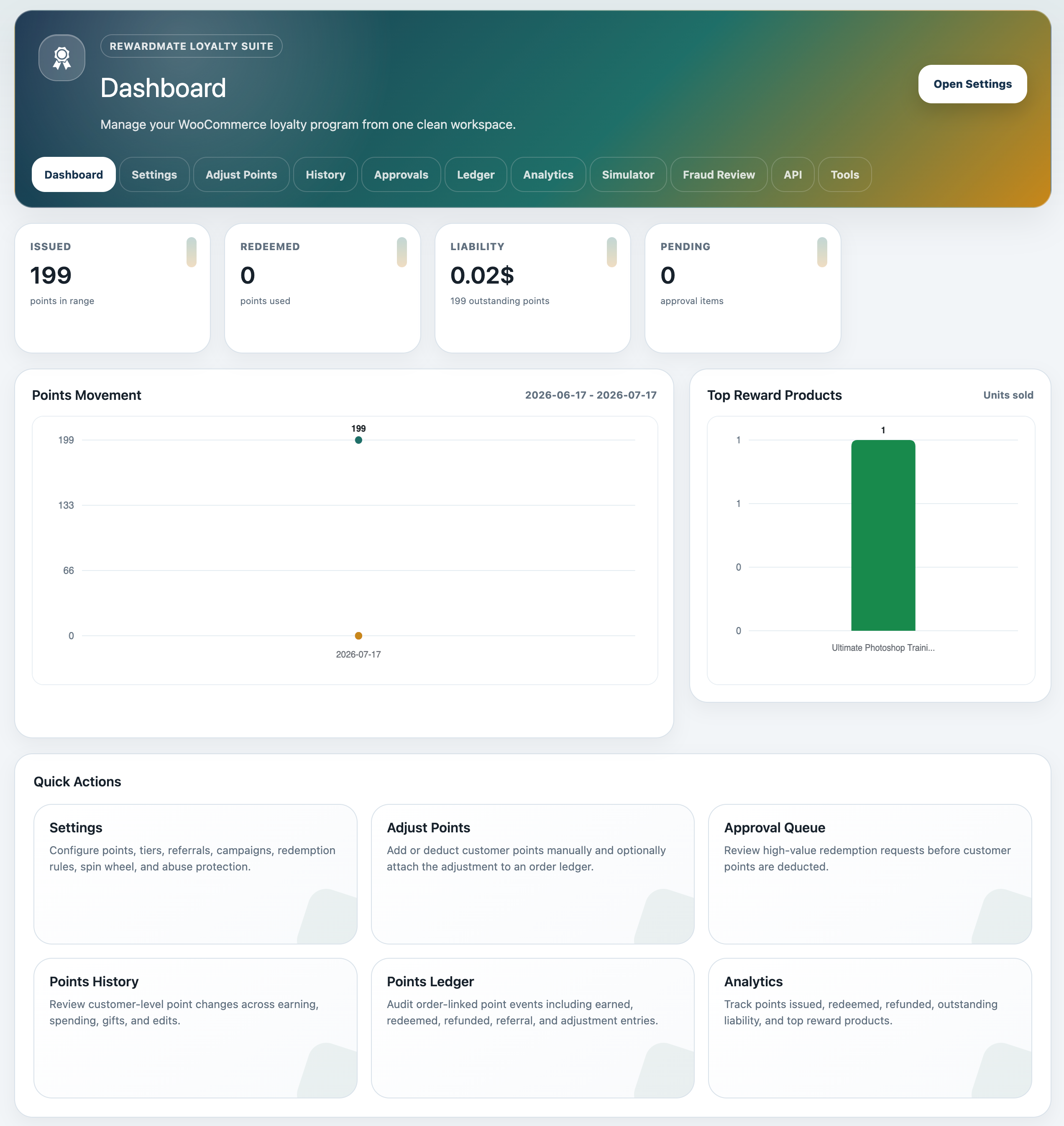
wp-admin/admin.php?page=rewardmate#tiers
VIP Tiers
RewardMate Pro VIP Tiers
zoom_in Click to Zoom
photo_camera RewardMate Pro Exclusive: VIP Loyalty Tiers, Tier-Exclusive Product Variations, and VIP Free Shipping perks. settings-tiers.png
wp-admin/admin.php?page=rewardmate
Admin Control
RewardMate Dashboard Command Center
zoom_in Click to Zoom
photo_camera Both Free and Pro include the complete core points earning, checkout slider, daily check-in, and customer wallet. dashboard.png

RewardMate Free vs. RewardMate Pro

A side-by-side comparison of features between the core framework and the advanced activator suite.

RewardMate (Free Core)

  • Global Earning Ratio (Points per $1)
  • Checkout Redemption Slider Widget
  • Points Value configuration
  • Points display on product & checkout
  • Dynamic variation earnable points updates
  • Basic daily check-in points
  • Spin wheel checkouts game with server-side outcome validation
  • Customer Wallet dashboard tab
  • 6 Universal Shortcodes (Wallet, Check-in, Spin, Balance, History, Referral)
  • Manual admin adjustments
  • Automatic Refund Reversals & Partial Refund support

RewardMate Pro (Premium)

  • Optimized Bulk CSV Importers (7,400+ users, match by Email, Login, or ID)
  • Variation-Level Loyalty Exclusivity (Tier-gate specific product sizes/colors)
  • Automated Expiry & Grace Recovery
  • Email Notification Controls & Templates
  • Daily Check-In Streaks (Reward consecutive check-in counts)
  • Tier-Specific VIP Perks (Automatic Free Shipping, exclusive products)
  • Points Gifting & Transfers (Viral customer-to-customer points sending)
  • Dynamic Tier levels visual builder
  • Viral Referral marketing system
  • Category & product point multipliers
  • Point Purchases / Reward products
  • Promotion boost campaign scheduler
  • Abuse rate-limit rules & anti-tampering guards
  • Fraud logs review panel
  • REST API & Webhooks key access
  • CSV migration import/export tools
edit_note Continuous Improvement

Need More Details or Found a Gap?

Our technical writing and engineering team continuously expands RewardMate documentation with new real-world setups, code recipes, and guides.

rocket_launch GET STARTED IN MINUTES

Ready to Build Real Customer Loyalty?

Join thousands of smart WooCommerce merchants boosting lifetime value and repeat purchase rates with RewardMate.

No credit card required • Instant download • 100% money back guarantee